Film-Tech Cinema Systems
Film-Tech Forum ARCHIVE


my profile | my password | search | faq & rules | forum home
  next oldest topic   next newest topic
» Film-Tech Forum ARCHIVE   » Community   » Film-Yak   » Film-Tech web setup (Page 4)

 
This topic comprises 6 pages: 1  2  3  4  5  6 
 
Author Topic: Film-Tech web setup
Colin Wiseley
Expert Film Handler

Posts: 123
From: Blacksburg, VA
Registered: Dec 1999


 - posted 02-01-2002 01:47 PM      Profile for Colin Wiseley   Email Colin Wiseley   Send New Private Message       Edit/Delete Post 
You can change the font in the Windows 2000 and XP versions of Notepad. I can't remember if you could do it in 98 or NT. Just go to Format - Font.

------------------
Colin Wiseley
Lyric Theatre
Blacksburg, VA
www.thelyric.com

 |  IP: Logged

Adam Martin
I'm not even gonna point out the irony.

Posts: 3686
From: Dallas, TX
Registered: Nov 2000


 - posted 02-01-2002 02:24 PM      Profile for Adam Martin   Author's Homepage   Email Adam Martin       Edit/Delete Post 
In Notepad on Win98, go to Edit > Set Font. For some reason, I prefer coding in fixed-width fonts.

 |  IP: Logged

Joe Beres
Jedi Master Film Handler

Posts: 606
From: Minneapolis, MN, USA
Registered: Nov 2000


 - posted 02-01-2002 02:42 PM      Profile for Joe Beres   Email Joe Beres   Send New Private Message       Edit/Delete Post 
Hey Joe, the menu is back to it's old squishy ways again. Might you know why?

I have to admit that I use Dreamweaver, and I love it. The few problems I have with are far outweighed by it's benefits. Plus it made for an easy transition from design software like Pagemaker. Plus, I needed to do some web designing, but didn't have time to learn to code. Dreamweaver lets me see the code, so I am learning coding a bit as I go. Dreamweaver actually does put out fairly streamlined HTML. Front Page and the others are much, much worse.


 |  IP: Logged

Joe Redifer
You need a beating today

Posts: 12859
From: Denver, Colorado
Registered: May 99


 - posted 02-01-2002 02:59 PM      Profile for Joe Redifer   Author's Homepage   Email Joe Redifer   Send New Private Message       Edit/Delete Post 
Yeah I know why the menu is back to it's old, crushed ways. It should be fixed when Brad uploads my new file (I'm pretty sure he's busy right now, though). I removed the Javascript code and the meta tags since there were no reasons for either on the menubar frame.

Hopefully soon I will have an all-new interface scheme. It will look much nicer, load quicker and all that good shtuff. I am working on it.

 |  IP: Logged

Scott Norwood
Film God

Posts: 8146
From: Boston, MA. USA (1774.21 miles northeast of Dallas)
Registered: Jun 99


 - posted 02-01-2002 04:35 PM      Profile for Scott Norwood   Author's Homepage   Email Scott Norwood   Send New Private Message       Edit/Delete Post 
My preferred editor is vi. Brad hates it, but I really like it. It's fast, simple, powerful, and runs on just about every computing platform known to man.
http://www.darryl.com/vi.html

 |  IP: Logged

Brad Miller
Administrator

Posts: 17775
From: Plano, TX (36.2 miles NW of Rockwall)
Registered: May 99


 - posted 02-01-2002 04:54 PM      Profile for Brad Miller   Author's Homepage   Email Brad Miller       Edit/Delete Post 
<mumbles explicatives> VI SUCKS! <mumbles more explicatives>

And yes I will mess with the front page again this weekend when I have the time to sit down and re-organize things. Patience Luke.


 |  IP: Logged

James R. Hammonds, Jr
Jedi Master Film Handler

Posts: 931
From: Houston, TX, USA
Registered: Nov 2000


 - posted 02-01-2002 07:13 PM      Profile for James R. Hammonds, Jr   Email James R. Hammonds, Jr   Send New Private Message       Edit/Delete Post 
Is there a way to make the winodw flash if someone new comes in?
Sometimes im the only person in there and forget to click over for a few minutes and someone else will come in and and leave cause I dont respond.
I should try to remember to click over more often, though.

 |  IP: Logged

Joe Redifer
You need a beating today

Posts: 12859
From: Denver, Colorado
Registered: May 99


 - posted 02-01-2002 07:15 PM      Profile for Joe Redifer   Author's Homepage   Email Joe Redifer   Send New Private Message       Edit/Delete Post 
It should play a sound whenever someone enters. At least it did when I was in there. Haven't been in for a long while, though. So the sound may have been removed.

 |  IP: Logged

Brad Miller
Administrator

Posts: 17775
From: Plano, TX (36.2 miles NW of Rockwall)
Registered: May 99


 - posted 02-01-2002 08:46 PM      Profile for Brad Miller   Author's Homepage   Email Brad Miller       Edit/Delete Post 
I will look into everything that has been posted on this weekend. If you have something to add that has not been addressed in this thread or the other one (Chat Room Ticking on My Computer), please add it. If you are only having problems that have already been mentioned in these two threads, just be patient please.

 |  IP: Logged

Brad Miller
Administrator

Posts: 17775
From: Plano, TX (36.2 miles NW of Rockwall)
Registered: May 99


 - posted 02-02-2002 04:12 AM      Profile for Brad Miller   Author's Homepage   Email Brad Miller       Edit/Delete Post 
Ok, as of this point, does everyone's screen look approximately like this? Please do not post here if your answer is "yes". Please only post if your screen does not look approximately like this picture. Remember, each browser and operating system will display the page just a little bit differently, so unless there is a major difference, do not post.
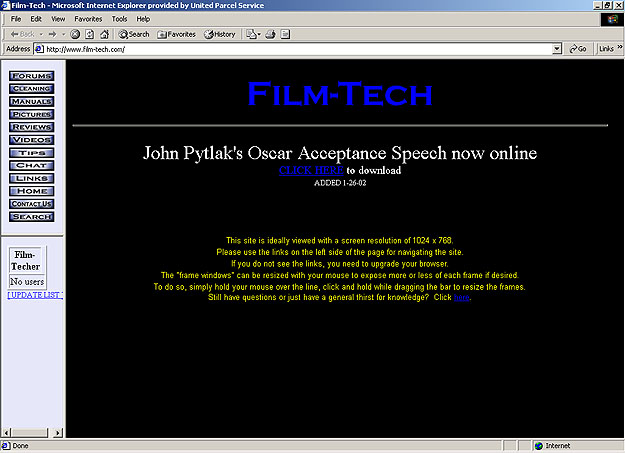
Also, is anyone having technical problems navigating the site as it is now? If so, please post the operating system you are using (Windows/Mac) and what browser you are using (Internet Explorer/Netscape/Opera). Again, if you are not experiencing problems, please do not post.


 |  IP: Logged

Randy Stankey
Film God

Posts: 6539
From: Erie, Pennsylvania
Registered: Jun 99


 - posted 02-02-2002 03:45 PM      Profile for Randy Stankey   Email Randy Stankey   Send New Private Message       Edit/Delete Post 
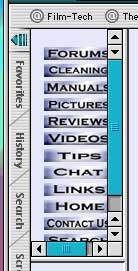
I'm getting this, using IE 5.1 (Mac):

I can move the frames to make them right but when the site auto-reloads they jump back to the way they were.

Other than that, everything seems to be OK.


 |  IP: Logged

Joe Redifer
You need a beating today

Posts: 12859
From: Denver, Colorado
Registered: May 99


 - posted 02-02-2002 04:03 PM      Profile for Joe Redifer   Author's Homepage   Email Joe Redifer   Send New Private Message       Edit/Delete Post 
Randy-

On IE 5 press Command-T to get rid of that crappy "Favorites/History/Search/Etc" column on the left. If you need it for any reason just press those same buttons again. There is no reason to have that column on the left side of the browser. it is very annoying. I RARELY use it and turn it back off when I am done.

It should look like this:
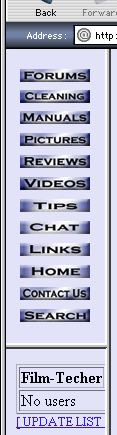
Or maybe you are using one of those iMacs that have a really pissy resolution. It shoud look fine at 800 x 600 or 832 x 624


 |  IP: Logged

Brad Miller
Administrator

Posts: 17775
From: Plano, TX (36.2 miles NW of Rockwall)
Registered: May 99


 - posted 02-02-2002 05:02 PM      Profile for Brad Miller   Author's Homepage   Email Brad Miller       Edit/Delete Post 
Randy, are you grabbing the actual vertical bar separating the navigational frame and the site, or are you just using the slider bar right where the "search" icon is on your picture above? I've tried this with Netscape and IE and the frame sizes stay put like they should if the user alters them.

 |  IP: Logged

Joe Redifer
You need a beating today

Posts: 12859
From: Denver, Colorado
Registered: May 99


 - posted 02-02-2002 05:32 PM      Profile for Joe Redifer   Author's Homepage   Email Joe Redifer   Send New Private Message       Edit/Delete Post 
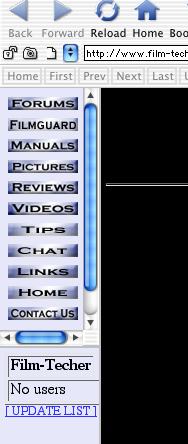
IE seems to be at fault. At least on the Mac, anyway. In both mac OS 9 and Mac OS X IE 5 will resizee the frames to the default setting when the screen refreshes. Why? 'Cause it's a crappy browser, especially at low resolutions. Netscape does not have this problem in any OS.

Below is what Opera 5 looks like in Mac OS X. Opera doesn't even let you resize the frames if you want to. Why? Because Opera sucks... at least for the Mac. Actually I don't think the Mac has ANY browsers which you could call "good".


 |  IP: Logged

John Westlund
Expert Film Handler

Posts: 204
From: Burney, CA, USA
Registered: Jun 2001


 - posted 02-02-2002 05:45 PM      Profile for John Westlund   Email John Westlund   Send New Private Message       Edit/Delete Post 
The site is very slow for me. It looks pretty good though. Im using Windows XP and IE. 6

 |  IP: Logged


All times are Central (GMT -6:00)
This topic comprises 6 pages: 1  2  3  4  5  6 
 
   Close Topic    Move Topic    Delete Topic    next oldest topic   next newest topic
 - Printer-friendly view of this topic
Hop To:


Powered by Infopop Corporation
UBB.classicTM 6.3.1.2

The Film-Tech Forums are designed for various members related to the cinema industry to express their opinions, viewpoints and testimonials on various products, services and events based upon speculation, personal knowledge and factual information through use, therefore all views represented here allow no liability upon the publishers of this web site and the owners of said views assume no liability for any ill will resulting from these postings. The posts made here are for educational as well as entertainment purposes and as such anyone viewing this portion of the website must accept these views as statements of the author of that opinion and agrees to release the authors from any and all liability.

© 1999-2020 Film-Tech Cinema Systems, LLC. All rights reserved.