Film-Tech Cinema Systems
Film-Tech Forum ARCHIVE


my profile | my password | search | faq & rules | forum home
  next oldest topic   next newest topic
» Film-Tech Forum ARCHIVE   » Community   » Film-Yak   » Windows 8 revealed (Page 2)

 
This topic comprises 4 pages: 1  2  3  4 
 
Author Topic: Windows 8 revealed
Ian Parfrey
Phenomenal Film Handler

Posts: 1049
From: Imbil Australia 26 deg 27' 42.66" S 152 deg 42' 23.40" E
Registered: Feb 2009


 - posted 06-04-2011 03:19 PM      Profile for Ian Parfrey   Email Ian Parfrey   Send New Private Message       Edit/Delete Post 
Found this under the video in Joe's link.

quote:
Adding comments has been disabled for this video.
[Roll Eyes]

 |  IP: Logged

Mike Blakesley
Film God

Posts: 12767
From: Forsyth, Montana
Registered: Jun 99


 - posted 06-04-2011 06:12 PM      Profile for Mike Blakesley   Author's Homepage   Email Mike Blakesley   Send New Private Message       Edit/Delete Post 
That's just because there are too many people who love to bash Microsoft just for the sake of doing it. Diehard Mac users, for example. Why bash Microsoft when you don't use their stuff?

It reminds me of how every time there is a story in a newspaper website about some church thing, the comments get filled up with "non-believers" bashing religion. My question is, why are they even reading the church-related news?

I think if Microsoft figured out a way for your computer to automatically give you $10,000 a year, there would be people bitching because it wasn't $15,000.

 |  IP: Logged

Joe Redifer
You need a beating today

Posts: 12859
From: Denver, Colorado
Registered: May 99


 - posted 06-04-2011 06:34 PM      Profile for Joe Redifer   Author's Homepage   Email Joe Redifer   Send New Private Message       Edit/Delete Post 
The reverse is also true, Mike. People love bashing Apple. You can't say one deserves it while the other doesn't. BOTH deserve the bashing. While obviously you can't please everybody, perhaps the extreme negative outrage over this latest Windows will make MS change their plans before release.

 |  IP: Logged

Chris Slycord
Film God

Posts: 2986
From: 청주시, 경북도, South Korea
Registered: Mar 2007


 - posted 06-04-2011 07:15 PM      Profile for Chris Slycord   Email Chris Slycord   Send New Private Message       Edit/Delete Post 
Likely, Windows 8 will have an option to switch between this interface and a simpler one similar to Windows 7, although I'm with Brad on the idea that the bottom taskbar should have names instead of icons. That's definitely something that should be changed on 7.

 |  IP: Logged

Joe Redifer
You need a beating today

Posts: 12859
From: Denver, Colorado
Registered: May 99


 - posted 06-04-2011 08:01 PM      Profile for Joe Redifer   Author's Homepage   Email Joe Redifer   Send New Private Message       Edit/Delete Post 
You guys haven't enabled the Classic Mode in Windows 7?

Also, I'm not sure about text over icons in the task bar. Text takes up way too much room if you have a lot of stuff open and quickly becomes truncated. I like icons and display the full text if I hover over them like the Mac OS dock. I am familiar with my icons so I don't really find it confusing.

 |  IP: Logged

Martin McCaffery
Film God

Posts: 2481
From: Montgomery, AL
Registered: Jun 99


 - posted 06-04-2011 08:05 PM      Profile for Martin McCaffery   Author's Homepage   Email Martin McCaffery   Send New Private Message       Edit/Delete Post 
The scary thing about the linked video is how badly it is recorded. Are they trying to keep YouTube from being the future of filmed entertainment, or were they incapable of making a decent sounding and looking recording?

 |  IP: Logged

Brad Miller
Administrator

Posts: 17775
From: Plano, TX (36.2 miles NW of Rockwall)
Registered: May 99


 - posted 06-04-2011 08:55 PM      Profile for Brad Miller   Author's Homepage   Email Brad Miller       Edit/Delete Post 
Can someone please post a screenshot of Windows 7 with classic mode enabled and a few different programs running (at least 2 instances of the same program)? I'm betting it isn't really classic mode.

 |  IP: Logged

Chris Slycord
Film God

Posts: 2986
From: 청주시, 경북도, South Korea
Registered: Mar 2007


 - posted 06-04-2011 09:35 PM      Profile for Chris Slycord   Email Chris Slycord   Send New Private Message       Edit/Delete Post 
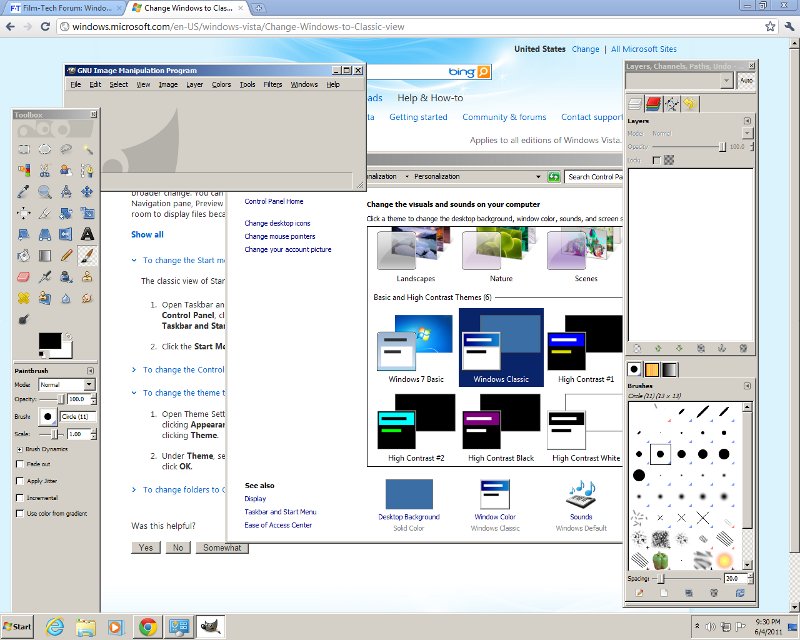
 -

And with multiple instances of the same program, there only is one "instance" showing in the bottom of the screen.
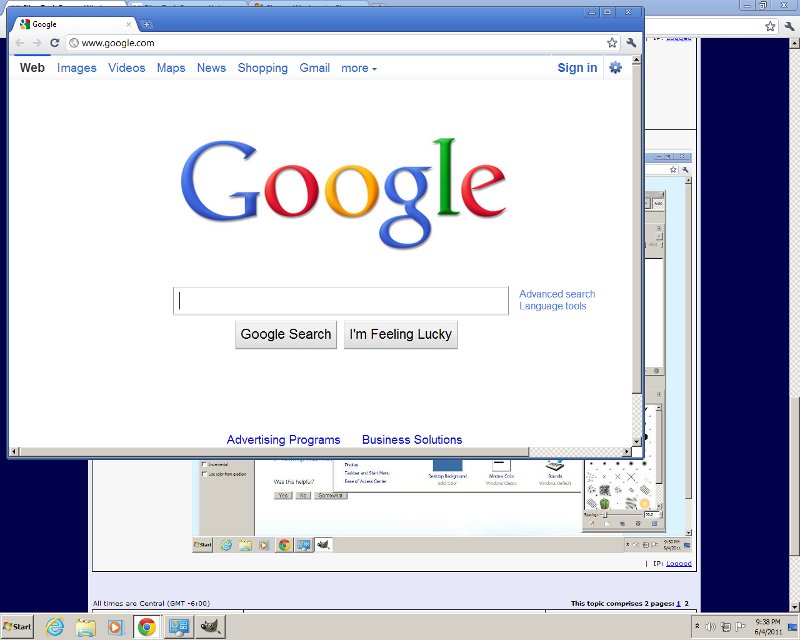
 -

 |  IP: Logged

Brad Miller
Administrator

Posts: 17775
From: Plano, TX (36.2 miles NW of Rockwall)
Registered: May 99


 - posted 06-04-2011 09:44 PM      Profile for Brad Miller   Author's Homepage   Email Brad Miller       Edit/Delete Post 
Wow, what a mess. I have some questions just based off of this image.

I see Internet Explorer there by the start button. Is that there because you actually use IE (remind me to slap you) or because Windows won't let you delete it?

I also see Windows Explorer (which is good), some play button, what I think is Windows Media Player, an icon of a game controller and a bird (or maybe a dog's head). THAT is exactly my point. What is that??? WHY can they not have actual TEXT there??? And if you have two IE windows open, I'll bet you only get one little "e" icon forcing you to either double click or hover, wait and THEN click, right?

EDIT - I saw you just posted a second screenshow. Where are the normal FILE - EDIT menus?

 |  IP: Logged

Chris Slycord
Film God

Posts: 2986
From: 청주시, 경북도, South Korea
Registered: Mar 2007


 - posted 06-04-2011 09:49 PM      Profile for Chris Slycord   Email Chris Slycord   Send New Private Message       Edit/Delete Post 
The IE icon is there by default. I've just never bothered removing it from the taskbar. And to your other question, check that I edited the post with another screenshot. Your guess is correct. You get one icon at the bottom of the page no matter how many instances you've got of a program running.

And you don't see the file menu because chrome browser defaults to not using them and puts it all in the little options icon on the far right...

 |  IP: Logged

Brad Miller
Administrator

Posts: 17775
From: Plano, TX (36.2 miles NW of Rockwall)
Registered: May 99


 - posted 06-04-2011 10:06 PM      Profile for Brad Miller   Author's Homepage   Email Brad Miller       Edit/Delete Post 
Icons are stupid. Windows 7 still sucks. I know I am not the only person who feels that way and continues to stick with XP because of it. Microsoft screwed up by not providing some sort of XP view.

 |  IP: Logged

Randy Stankey
Film God

Posts: 6539
From: Erie, Pennsylvania
Registered: Jun 99


 - posted 06-04-2011 10:25 PM      Profile for Randy Stankey   Email Randy Stankey   Send New Private Message       Edit/Delete Post 
That funny looking icon is the GIMP.

http://www.gimp.org/

 |  IP: Logged

Joe Redifer
You need a beating today

Posts: 12859
From: Denver, Colorado
Registered: May 99


 - posted 06-04-2011 10:55 PM      Profile for Joe Redifer   Author's Homepage   Email Joe Redifer   Send New Private Message       Edit/Delete Post 
LOL, you guys don't know Windows 7's Classic mode very well. I'll have to find my hard drive with W7 on it in a bit and plug it in to my Mac and boot it up.

quote: Brad Miller
I also see Windows Explorer (which is good), some play button, what I think is Windows Media Player, an icon of a game controller and a bird (or maybe a dog's head). THAT is exactly my point. What is that???
If it was an application that you personally used, you'd know. The only time it would ever be confusing is the first time you used it, but even then since you didn't recognize it, you'd probably figure it was for the new application you just installed. If you are still confused, I'm pretty sure that W7 lets you hover your mouse over it and the full text is revealed.

 |  IP: Logged

Chris Slycord
Film God

Posts: 2986
From: 청주시, 경북도, South Korea
Registered: Mar 2007


 - posted 06-04-2011 11:23 PM      Profile for Chris Slycord   Email Chris Slycord   Send New Private Message       Edit/Delete Post 
I was figuring when you said "classic mode" you meant enabling the classic theme, which I did. But now I see what it is that you were referring to (I think).

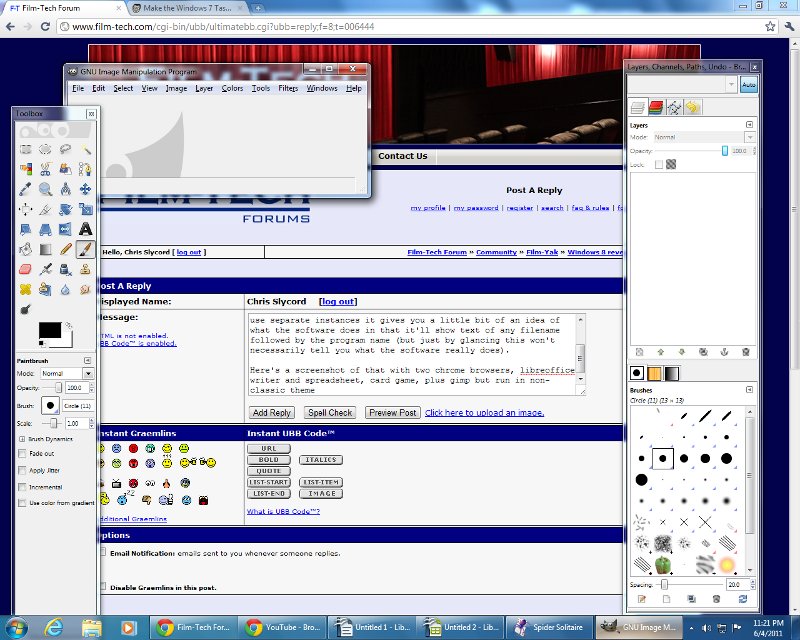
In any case, Brad, you can make the taskbar have separate icons for each running instance of a program. And when you do have it use separate instances it gives you a little bit of an idea of what the software does in that it'll show text of any filename followed by the program name (but just by glancing this won't necessarily tell you what the software really does).

Here's a screenshot of that with two chrome browsers, libreoffice writer and spreadsheet, card game, plus gimp but run in non-classic theme

 -

 |  IP: Logged

Joe Redifer
You need a beating today

Posts: 12859
From: Denver, Colorado
Registered: May 99


 - posted 06-04-2011 11:42 PM      Profile for Joe Redifer   Author's Homepage   Email Joe Redifer   Send New Private Message       Edit/Delete Post 
Yeah, here is how it looks in CLASSIC mode:

 -

Ooops I guess I can't show you because PNG doesn't work on Film-Tech. What the fuck, Adam? It's 2011, not 1996.

Anyway, it looks exactly like Windows 98.

 |  IP: Logged


All times are Central (GMT -6:00)
This topic comprises 4 pages: 1  2  3  4 
 
   Close Topic    Move Topic    Delete Topic    next oldest topic   next newest topic
 - Printer-friendly view of this topic
Hop To:


Powered by Infopop Corporation
UBB.classicTM 6.3.1.2

The Film-Tech Forums are designed for various members related to the cinema industry to express their opinions, viewpoints and testimonials on various products, services and events based upon speculation, personal knowledge and factual information through use, therefore all views represented here allow no liability upon the publishers of this web site and the owners of said views assume no liability for any ill will resulting from these postings. The posts made here are for educational as well as entertainment purposes and as such anyone viewing this portion of the website must accept these views as statements of the author of that opinion and agrees to release the authors from any and all liability.

© 1999-2020 Film-Tech Cinema Systems, LLC. All rights reserved.