Film-Tech Cinema Systems
Film-Tech Forum ARCHIVE


my profile | my password | search | faq & rules | forum home
  next oldest topic   next newest topic
» Film-Tech Forum ARCHIVE   » Community   » Film-Yak   » Windows 8 revealed (Page 3)

 
This topic comprises 4 pages: 1  2  3  4 
 
Author Topic: Windows 8 revealed
Brad Miller
Administrator

Posts: 17775
From: Plano, TX (36.2 miles NW of Rockwall)
Registered: May 99


 - posted 06-05-2011 02:48 AM      Profile for Brad Miller   Author's Homepage   Email Brad Miller       Edit/Delete Post 

quote: Joe Redifer
I'm pretty sure that W7 lets you hover your mouse over it and the full text is revealed.
Screw that. Hovering wastes time. Just give me visible TEXT all the time. (And yes I realize it only takes one second, but regardless it is just as much of an annoyance as an extra mouse click.)

quote: Chris Slycord
Here's a screenshot of that with two chrome browsers, libreoffice writer and spreadsheet, card game, plus gimp but run in non-classic theme
MUCH better. You're getting closer, but where is my START button and why are the quick launch icons wasting so much of the taskbar space? Can the taskbar be raised to 2 or 3 rows? And what is this gimp and why do I care? I mean Pulp Fiction was an awesome movie, but I don't need to be reminded of it every 5 minutes of the day. (And don't tell me you don't think about that scene every time you hear "gimp".)

quote: Joe Redifer
Ooops I guess I can't show you because PNG doesn't work on Film-Tech.
Use your fancy schmantsy Photoshop to convert it to a jpg.

 |  IP: Logged

Joe Redifer
You need a beating today

Posts: 12859
From: Denver, Colorado
Registered: May 99


 - posted 06-05-2011 03:05 AM      Profile for Joe Redifer   Author's Homepage   Email Joe Redifer   Send New Private Message       Edit/Delete Post 
quote: Brad Miller
Use your fancy schmantsy Photoshop to convert it to a jpg.
Screw that. And yes I realize it only takes a few seconds, but regardless it is just as much of an annoyance and when posting pics of computer graphics, PNG works best. In fact, I'm pretty sure I used to be able to post PNG to Film-Tech. Film-Tech is ahead of the curve in cinema hardware. The website should be modern, too.

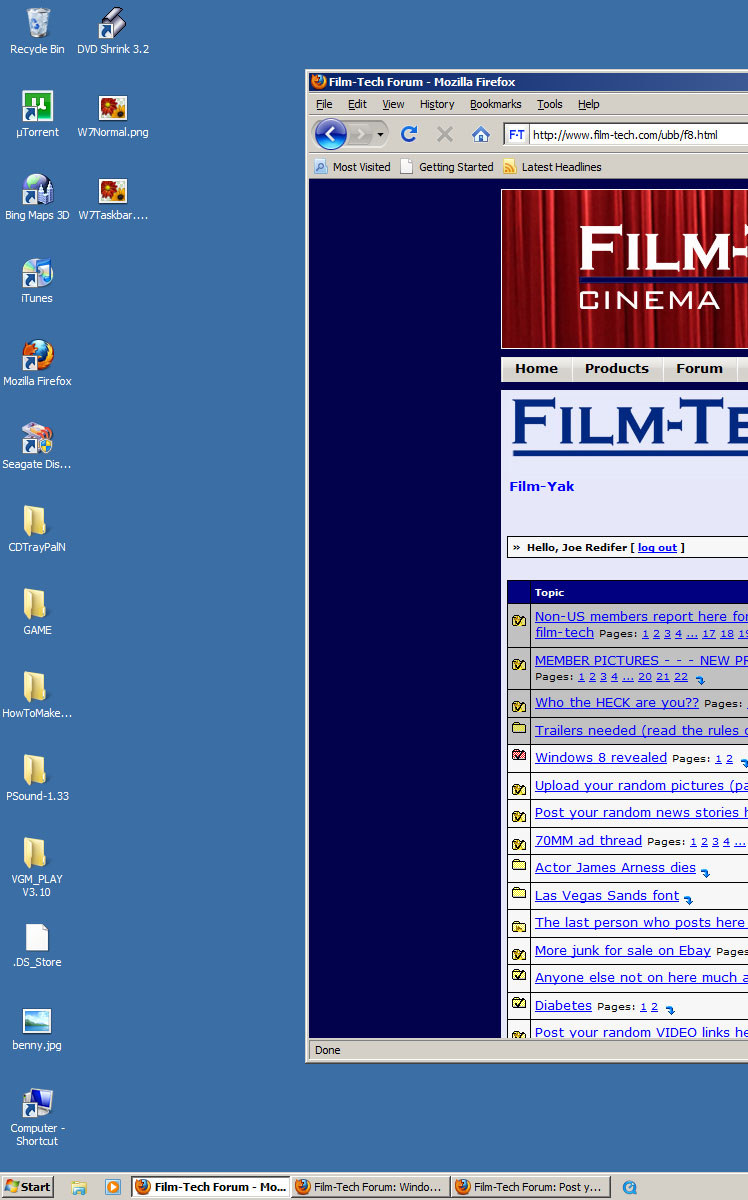
Anyway, here is the pic:
http://www.joeredifer.com/crap/W73.png

quote: Brad Miller
Can the taskbar be raised to 2 or 3 rows?
Yep. Just drag it up.

quote: Brad Miller
And what is this gimp and why do I care?
Gimp is a free image editor, kind of like Photoshop with high-functioning autism. You care because you asked.

quote: Brad Miller
Pulp Fiction was an awesome movie, but I don't need to be reminded of it every 5 minutes of the day.
Every ten minutes, then? I agree every 5 is too much.

 |  IP: Logged

Brad Miller
Administrator

Posts: 17775
From: Plano, TX (36.2 miles NW of Rockwall)
Registered: May 99


 - posted 06-05-2011 11:58 AM      Profile for Brad Miller   Author's Homepage   Email Brad Miller       Edit/Delete Post 
Here is your pic in wonderful jpg Joe


 -

And THAT is pretty close to awesome. I'll have to give Windows 7 a shot and see if I can turn off the "i" to achieve that.

 |  IP: Logged

Sean Weitzel
Jedi Master Film Handler

Posts: 619
From: Vacaville, CA (1790 miles west of Rockwall)
Registered: Dec 1999


 - posted 06-05-2011 01:51 PM      Profile for Sean Weitzel   Email Sean Weitzel   Send New Private Message       Edit/Delete Post 
I had win7 initially configured like Joe, but eventually spiced it up a little bit.
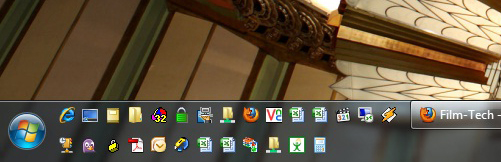
For example, While I don't have a problem with the more modern start button, I am a huge fan of the Quick Launch area, so I re-added the quicklaunch to the task bar. I also never understood "pinning" an application to the task bar. This is how my task bar normally looks
 -

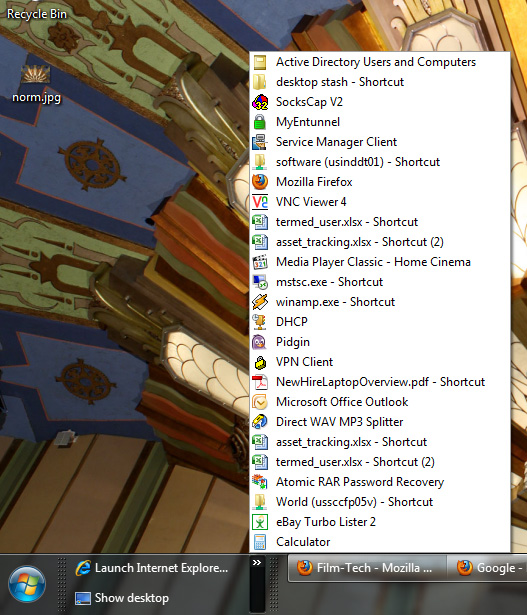
But if you want to be crazy, you can enable full text names for the quicklaunch icons:
 -

One thing to be cautious of with Win 7 is that some legacy apps flatly will not even run with the whiz-bang aero desktop theme enabled, they REQUIRE the classic non-enhanced desktop. Also be VERY careful if you decide to install 64 bit. Lots of legacy 32 bit applications will run fine, but some won't. Also flash enabled websites will give you freezing issues since Adobe has their head up their ass and haven't come out with a stable 64 bit native flash that I am aware of at least.

 |  IP: Logged

Mike Blakesley
Film God

Posts: 12767
From: Forsyth, Montana
Registered: Jun 99


 - posted 06-05-2011 02:02 PM      Profile for Mike Blakesley   Author's Homepage   Email Mike Blakesley   Send New Private Message       Edit/Delete Post 
I've used Adobe Pagemaker 7 for about a hundred years to make my newspaper ads. It's easy, quick and I know all the shortcuts. Then I would convert the file to PDF to send to the paper. But that's the ONE thing I can't get to work on Win7 -- PM's convert utility just hangs the program. I'm sure there's some other way to convert a Pagemaker file to a PDF, but haven't had time to research it yet. For now I do my ads on my computer at work, which still has XP.

Probably will begrudgingly abandon PM at some point, I guess... it makes me a little sad, since it was one of the first "high end" programs I owned. (Maybe this is a sign I should cut-out the newspaper advertising?!)

 |  IP: Logged

Sean Weitzel
Jedi Master Film Handler

Posts: 619
From: Vacaville, CA (1790 miles west of Rockwall)
Registered: Dec 1999


 - posted 06-05-2011 02:13 PM      Profile for Sean Weitzel   Email Sean Weitzel   Send New Private Message       Edit/Delete Post 
That's strange, Mike. I have Pagemaker 7 installed right here on this Win7 32 bit and don't have a problem exporting to PDF from within the app. Try uninstalling your printers, maybe a driver is in the way. If that doesn't help maybe try re-installing Acrobat or even uncheck the box that tries to auto display the exported PDF when the conversion is done.

The workaround should all this fail would be to purchase the full version of acrobat that allows PDF creation. It creates a virtual PDF printer. You just tell pagemaker to print to the PDF distiller.

 |  IP: Logged

Frank Cox
Film God

Posts: 2234
From: Melville Saskatchewan Canada
Registered: Apr 2011


 - posted 06-05-2011 02:34 PM      Profile for Frank Cox   Author's Homepage   Email Frank Cox   Send New Private Message       Edit/Delete Post 
I use Scribus for my desktop publishing needs. It has a bit of a learning curve but it works very well and there is a Windows version (though I've never used that.)

Scribus is free software.

There is a section on the Scribus website that showcases some examples of what it can do. I have personally used it to create layouts for flyers, advertising cut sheets for both print and online, fridge magnets, labels for candy bags, custom printed plastic bags for my cotton candy, envelopes, business cards, notepads, signs, and probably a lot more stuff that I can't think of offhand. Friends of mine layout two weekly newspapers with it.

 |  IP: Logged

Frank Angel
Film God

Posts: 5305
From: Brooklyn NY USA
Registered: Dec 1999


 - posted 06-05-2011 02:38 PM      Profile for Frank Angel   Author's Homepage   Email Frank Angel   Send New Private Message       Edit/Delete Post 
quote: Brad Miller
I know I am not the only person who feels that way and continues to stick with XP because of it. Microsoft screwed up by not providing some sort of XP view.

No, Brad, you certainly are NOT. All of CUNY (City University of New York), consisting of some 27 senior and junior colleges, after lots of evaluation have opted not to move past Win XP SP3. Vista came and (thankfully) went, and Win 7 but each ITS department in each college has turned down both vista and Win 7.

I speak to the chief IT guy at BC all the time and he said that have a hundred reasons why XP satisfied their needs better than later incarnations. They all know over there that they will eventually have to move past XP because MS will stop supporting it, but they will wait until MS comes up with an OS that performs with as much stability and as cleanly as XP.

I am sure none of them over at ITS will be too thrilled with this maschugina piece of fluff.

 |  IP: Logged

Chris Slycord
Film God

Posts: 2986
From: 청주시, 경북도, South Korea
Registered: Mar 2007


 - posted 06-05-2011 02:45 PM      Profile for Chris Slycord   Email Chris Slycord   Send New Private Message       Edit/Delete Post 
quote: Brad Miller
You're getting closer, but where is my START button and why are the quick launch icons wasting so much of the taskbar space?
If you switch to the "classic theme" that I showed earlier, it'll give you a button that says start. All you'd have to do is enable the classic theme then choose to have the taskbar never combine buttons.

And the icons are big because that's how they are in the default theme.

quote: Brad Miller
Can the taskbar be raised to 2 or 3 rows?
By default, the taskbar is locked into place but when you deselect locking it, you can resize the taskbar to take up to half the screen if you wanted

quote: Brad Miller
And what is this gimp and why do I care? I mean Pulp Fiction was an awesome movie, but I don't need to be reminded of it every 5 minutes of the day. (And don't tell me you don't think about that scene every time you hear "gimp".)
gimp is a free/open source image manipulation program. And I wasn't reminding you of the program. I was pointing out what programs were in the screenshot as a comparison to earlier and for some strange reason when I was resizing images to throw them up on your fancy "i can only take 800 pixels-wide" website, I decided to leave the thing open. [Razz]

 |  IP: Logged

Joe Redifer
You need a beating today

Posts: 12859
From: Denver, Colorado
Registered: May 99


 - posted 06-05-2011 03:35 PM      Profile for Joe Redifer   Author's Homepage   Email Joe Redifer   Send New Private Message       Edit/Delete Post 
What does everyone use the START button for? The only time I really ever use it is to go to the Control Panels menu or find the command prompt if I need to run some underdeveloped application. I never launch apps from it and as a file directory it sucks ass.

 |  IP: Logged

Brad Miller
Administrator

Posts: 17775
From: Plano, TX (36.2 miles NW of Rockwall)
Registered: May 99


 - posted 06-05-2011 04:23 PM      Profile for Brad Miller   Author's Homepage   Email Brad Miller       Edit/Delete Post 
I played with a Windows 7 install for a bit today and indeed I can make it look like Joe's picture. Unfortunately they have jumbled most other things around trying to make it more "user friendly" so I now have to go FIND where they are. [Mad] Other than that, I might give it some consideration, but geez Firefox 4 sucks. Any program that removes my standard file/edit/view/etc links at the top of the window pisses me off.


 |  IP: Logged

Anslem Rayburn
Master Film Handler

Posts: 476
From: Yuma, AZ, USA
Registered: May 2002


 - posted 06-05-2011 04:43 PM      Profile for Anslem Rayburn   Email Anslem Rayburn   Send New Private Message       Edit/Delete Post 
Brad, just click the Firefox button, go to options, and select Menu Bar. It will add the old File/Edit/View bar and get rid of the Firefox button.

 |  IP: Logged

Joe Redifer
You need a beating today

Posts: 12859
From: Denver, Colorado
Registered: May 99


 - posted 06-05-2011 08:03 PM      Profile for Joe Redifer   Author's Homepage   Email Joe Redifer   Send New Private Message       Edit/Delete Post 
My Firefox 4 has all of the FILE EDIT VIEW etc, but I am on the Mac version now. In fact I did install it on my Windows XP computer as well and they are still there I believe and I don't recall needing to turn them back on.

But anyway, as I've learned in the past, computers and their UI can't/won't stay the same forever. You will eventually need to learn the new locations of things or stop using new programs altogether since they won't be supported on older OS's. What if Dolby creates some bullshit that everyone needs that only works with Windows 8? And if you try to put it in a classic mode, the Dolby program breaks? Still, you can ever win because I'm sure there are a lot of essential programs that REQUIRE Windows ME or some such nonsense. You need old and new. I've found that the "compatibility modes" in Windows generally don't do shit.

That said, I don't care for the control panel in Windows 7. It groups things into ambiguous clusters instead of each having its own icon. That's an unnecessary extra click and sometimes you need to guess which one to click on.

 |  IP: Logged

Scott Norwood
Film God

Posts: 8146
From: Boston, MA. USA (1774.21 miles northeast of Dallas)
Registered: Jun 99


 - posted 06-05-2011 09:02 PM      Profile for Scott Norwood   Author's Homepage   Email Scott Norwood   Send New Private Message       Edit/Delete Post 
Has anyone else found the 32-bit version of Win7 to be signficantly less stable than the 64-bit version of same? That has been my observation with a few dozen users running it (mostly the 64-bit version).

I will also say that, if you want a 64-bit Windows OS, Win7 is the best option at the moment. WinXP-64 is fairly stable, but it was never very popular and hardware support (i.e. drivers) is pretty bad for most devices. Vista-64 is a bad joke.

The UI issues don't bother me much, as I have never particularly liked the Windows GUI. I just turn off all the eye candy (control panel->system->advanced->performance->adjust for best performance). Once this is done, performance improves noticeably.

 |  IP: Logged

Joe Redifer
You need a beating today

Posts: 12859
From: Denver, Colorado
Registered: May 99


 - posted 06-05-2011 10:59 PM      Profile for Joe Redifer   Author's Homepage   Email Joe Redifer   Send New Private Message       Edit/Delete Post 
I am running the 64-bit version of Windows 7 and have updated it every week and had no problems, though I still use the Mac OS more (which has a psuedo-64-bit OS). I think the OS updates come out each Wednesday. The service packs are just collections of those updates.

 |  IP: Logged


All times are Central (GMT -6:00)
This topic comprises 4 pages: 1  2  3  4 
 
   Close Topic    Move Topic    Delete Topic    next oldest topic   next newest topic
 - Printer-friendly view of this topic
Hop To:


Powered by Infopop Corporation
UBB.classicTM 6.3.1.2

The Film-Tech Forums are designed for various members related to the cinema industry to express their opinions, viewpoints and testimonials on various products, services and events based upon speculation, personal knowledge and factual information through use, therefore all views represented here allow no liability upon the publishers of this web site and the owners of said views assume no liability for any ill will resulting from these postings. The posts made here are for educational as well as entertainment purposes and as such anyone viewing this portion of the website must accept these views as statements of the author of that opinion and agrees to release the authors from any and all liability.

© 1999-2020 Film-Tech Cinema Systems, LLC. All rights reserved.