|
|
This topic comprises 7 pages: 1 2 3 4 5 6 7
|
|
Author
|
Topic: Dolby DSP100 Show Player stops suddenly whilst playing trailer
|
|
|
|
|
|
|
|
|
Carsten Kurz
Film God
Posts: 4340
From: Cologne, NRW, Germany
Registered: Aug 2009
|
 posted 01-22-2018 07:52 AM


Peter - what software version is the DSS100 running now?
Yes, you may replace the 500GB drives one by one with 1TB drives (but make sure you buy all 4 new drives at once). Initially, the RAID will not increase it's size, but when you re-init it later, it will double.
I don't know if you are able to identify that drive issue in the logs (look up SYSTEM - THEATRE DEVICES), so, maybe you can find only the problematic one and replace that first.
Then, change one drive per day, leave the server running over night. However, not every Dolby system version will do an automatic rebuild, hence my question about the version you are running. It could be very ancient...
- Carsten
| IP: Logged
|
|
|
|
Carsten Kurz
Film God
Posts: 4340
From: Cologne, NRW, Germany
Registered: Aug 2009
|
posted 01-22-2018 08:44 AM
Well, it's just that you should try to get 4 identical drives if possible.
Are these problematic trailers still on your RAID? You may be able to track down the disc that causes this issue in SYSTEM-THEATRE DEVICES, and only replace that drive. As a matter of fact, if ALL 4 drives in your RAID are still working (that is, the RAID is marked as healthy), you may even get rid of the halting and identify the drive by pulling it from the RAID. As it may be, a RAID working with only 3 fully healthy drives may actually perform better than a RAID with 4 drives with one of them having reliability issues. Of course, you lose failure redundancy with 3 drives, so pulling one should only be a short term measure to analyze the issue or find the faulty drive.
- Carsten
| IP: Logged
|
|
|
|
Leo Enticknap
Film God

Posts: 7474
From: Loma Linda, CA
Registered: Jul 2000
|
posted 01-22-2018 04:37 PM

quote: Steve Guttag
Note, if you have a suitable computer with enough storage capacity, you could FTP over the entire "Generated Packages" folder to get the content off.
That could take a very long time, unless
A - the connection is wired, and just through a dumb switch, not a router
B - the connection is gigabit (so through the theater network interface, not auditorium, which I believe is only 10/100, on some hardware revisions of the DSS100, at least)
C - the destination computer's LAN card supports jumbo packets, and the DSS's theatre network card is configured to use jumbo packets
But yes, if all of the above are "checks," then offloading the content that way is the easiest option, especially if you don't have a spare CRU cartridge to hand. Using a USB hard drive will take a helluva long time.
| IP: Logged
|
|
Peter Foyster
Expert Film Handler

Posts: 102
From: ROLEYSTONE WESTERN AUSTRALIA
Registered: Aug 2016
|
posted 01-23-2018 01:07 AM
Thanks guys,
I will have to keep this brief as I have just come back from the cinema and need to return for a show tonight. It is a 90 minute round trip.
The Show store software version is 4.3.5.9 and the Show Player 4.0.8.10.
I checked the RAID array again and noticed that in addition to 7 re-allocated sectors on Drive 4 there is now 1 re-allocated sector on drive 3.
I thought that, following Carsten's advice I would purchase 4 new drives and install them one at a time, to avoid having to have a re-install, a lengthy and very costly exercise for me.
Now that Steve and Leo have added to the mix, I am not so sure any more. The fact is that I have purchased a second hand Doremi Server and was going to have it installed in April. Perhaps that is what I should eventually be replacing the drives in and getting a software update for.
So, whether to replace the drives and carry on until the Doremi is installed or persist with the Dolby server.
One thing I like about the DSS100 is the CRU drive bay , whereas the Doremi can only ingest via USB, which is going to slow things down a bit.
At the moment I am running every piece of content before screening to provide some assurance that it won't stop on me.
I will have to give this some more thought on how to proceed. It really comes down to time and, unfortunately, money.
| IP: Logged
|
|
Steve Guttag
We forgot the crackers Gromit!!!

Posts: 12814
From: Annapolis, MD
Registered: Dec 1999
|
posted 01-23-2018 06:00 AM
4.3.5.9 is a very good version and quite stable. As such, that is where I'd start. Seriously, if you need to keep your content. Purchase a suitable sized drive and mount it into a CRU chassis (they are typically under $100US). I don't recall if the Dolby software had the CRU formatting script in it at that point getting the drive formatted properly may be a bit of a trick. If you know how to login on the Command Line interface (CLI) as an Administrator, then if you go to the scripts directory, if the script: formatStore.sh is there then you can likely have the DSS100 format the "new" CRU drive you will create. Note, it takes a while to format a drive this way. I did a 4TB drive and it was just over 20 minutes and there are not friendly little progress numbers letting you know what is going on. You just see the amber LED winking on the CRU bay letting you know it is busy. Once done, however, the CRU will mount.
Once you back your content up, install the new 1TB drives and run the INSTALL disc for 4.3.5.9 and you should be good to go to transfer content back.
Personally, I'd take a DSS100/DSP100 over Doremi anything, but that is just my opinion. What the Doremi brings is more compatibility with improperly formatted/made DCPs but with nasty interface that is quirky, to say the least.
| IP: Logged
|
|
Carsten Kurz
Film God
Posts: 4340
From: Cologne, NRW, Germany
Registered: Aug 2009
|
posted 01-23-2018 06:49 AM
Sounds as if that Doremi will be an IMS, as Peter mentions 'no CRU'? However, no IMS will work with the projectors he mentions...
With the DSS100 staying at 4.3.5.9, he'll probably be in trouble soon when SMPTE DCPs will become the norm.
Steve - it may be a piece of cake for you to do fresh installs, but for Peter, giving credit to his abilities, availability of proper setup discs, and his options to have techs on site, I don't think it's a good idea.
If the problematic trailer is still on the RAID, I would try to isolate the drive that is problematic by pulling it, playing, reinsert, pull another, etc., until he found the one that is/may be causing the issue. Then first exchange that drive. And of course start with the one that shows the most bad sectors. It appears that his systems otherwise is doing well, so why should he do a full reinstall, if a drive swap can possibly fix the issue?
- Carsten
| IP: Logged
|
|
Leo Enticknap
Film God
Posts: 7474
From: Loma Linda, CA
Registered: Jul 2000
|
posted 01-23-2018 08:03 AM
quote: Carsten Kurz
Sounds as if that Doremi will be an IMS, as Peter mentions 'no CRU'? However, no IMS will work with the projectors he mentions...
The DCP2000 does not have a built-in CRU reader, so we could be talking about one of those. One could be added either by using an external reader connected by USB2, or by FTP network ingest from a PC with a built-in SATA one. I guess it could be possible to add an eSATA card to the Doremi's motherboard, and add a CRU reader that way, if USB2 ingest speed is a problem, but I don't know how the software would react to that.
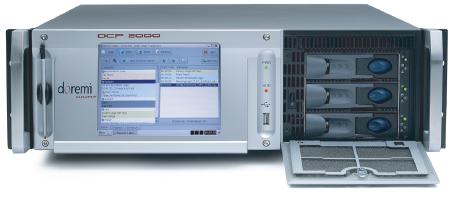
The other thing Peter will need to check, given that he's still running a pre-DCI version of the server software (4.3), is that his projector will support Cinelink II TLS link encryption. I'm not a Christie expert at all: I'm afraid that I don't even know if the CP2000M is Series 1 or 2. According to Christie's website, it is discontinued and was launched in 2009, so I'm guessing 1.
Peter - this issue is to do with the way the image data is encrypted as it passes through the dual SDI wires from the server's media block and the projector's secure input board. Very early digital cinema projectors can only use a method called Cinelink II DH, that DCI later outlawed, claiming that it isn't secure enough. As a result of this, later versions of server software (in the case of Dolby DSS servers, versions later than 4.3) do not support it. The most commonly used method now is Cinelink II TLS, but a few server and projector combinations that don't support DH can use Cinelink I.
You can see which method you currently have in use, by going to the system > theatre devices tab in Show Manager, and looking under the entry for the DSP100 show player. If the link encryption method says Cinelink II TLS, you have no problem, and can update the server's software, and/or replace the server, without worrying about this.
If it says Cinelink I or Cinelink II DH, then you could have a problem. In this scenario, it's important to consult a Christie expert to be sure that your projector can use TLS, before upgrading the server software to anything later than 4.3, or replacing the server with another one that might have a software version that cannot do TLS, such as the Doremi you're thinking of installing.
| IP: Logged
|
|
Carsten Kurz
Film God
Posts: 4340
From: Cologne, NRW, Germany
Registered: Aug 2009
|
posted 01-23-2018 08:31 AM
A CRU-less DCP-2000 may be expanded with an external SATA slot, there is even the official part still available from Dolby I think. However, anyone with decent computer building skills can insert a standard cable/slot available on ebay or other places, as it operates driver less on one of the free SATA connectors on the mainboard. The cheapest way then to proceed is to use a CRU Movedock, as the older, cheaper USB 2.0 MoveDocks ones offer a SATA connector on the back in addition to USB (the most recent v.3 MoveDock with USB 3.0. offers eSATA again, but at a price).
The Christie CP2000 units are all series 1, but their compatibility with the necessary encryption protocol is based on their board set, a nice wrap-up is here:
http://www.film-tech.com/ubb/f16/t001506.html
Another issue not being mentioned so far is that Peter is from Australia. Australia is a PAL (25fps) country. It may be that quite a few ads/trailers/shorts/features he receives are 25p. As the DSP100 does not support 25 frames per second in J2C/DCP (and never will), it is possible that some of the issues he experiences with the unit are caused by this (of course not those he mentions with the StarWars Trailers).
The Doremi, admittedly has the more clunky GUI, but at least doesn't suffer from that issue and will play 25fps content fine.
If Peter doesn't have to sell the DSS100/DSP100 in order to finance the Doremi, he should probably keep both.
Again, so far, Peter seems to do fine with his DOLBY, and the only issue so far seems to be a tipsy disc. So, as a short term measure, I would try to identify and change only this disc. This is also something that Peter has performed in the past, so he certainly is able to do it again without external help.
- Carsten
| IP: Logged
|
|
|
|
|
|
All times are Central (GMT -6:00)
|
This topic comprises 7 pages: 1 2 3 4 5 6 7
|
Powered by Infopop Corporation
UBB.classicTM
6.3.1.2
The Film-Tech Forums are designed for various members related to the cinema industry to express their opinions, viewpoints and testimonials on various products, services and events based upon speculation, personal knowledge and factual information through use, therefore all views represented here allow no liability upon the publishers of this web site and the owners of said views assume no liability for any ill will resulting from these postings. The posts made here are for educational as well as entertainment purposes and as such anyone viewing this portion of the website must accept these views as statements of the author of that opinion
and agrees to release the authors from any and all liability.
|

 Home
Home



 Printer-friendly view of this topic