|
|
This topic comprises 9 pages: 1 2 3 4 5 6 7 8 9
|
|
Author
|
Topic: The iNotaphone 4
|
|
|
Bobby Henderson
"Ask me about Trajan."

Posts: 10973
From: Lawton, OK, USA
Registered: Apr 2001
|
 posted 07-19-2010 08:49 PM


I've had the HTC Evo 4G phone for about six weeks. I don't have as many problems with mine as what David was experiencing with his. Naturally, I'm quite a bit more happy about with it.
I might have considered the Droid X if it had been available in early June, but I needed a new mobile phone and had already been doing without for a couple weeks. Sprint's unlimited data plan, even with the additional $10 "4G" fee, made for a significantly lower phone bill than what I would have paid through AT&T for an iPhone or an Android phone from Verizon.
The only major complaint I have about the HTC Evo 4G is its battery life. Any smart phone with a large LCD screen is going to use up battery life much faster than standard phones. The Evo 4G just takes battery drain to another level. One upshot is the battery is removable and can be easily replaced with a spare. It also doesn't take very long (maybe an hour or two) for the phone to recharge. My old Samsung phone would take around 4 hours to recharge.
I recharge my phone battery usually once per day, usually with between 50% and 30% remaining in the battery. I use the Advanced Task Killer application and also check the phone's running services to shut down anything I don't need running in the background. We don't have 4G service here in Lawton yet, so I leave the 4G and WiFi antenna turned off (Wichita Falls and at least a dozen or so other cities in Texas have 4G).
I think Sprint has better service quality here in Southwest Oklahoma than AT&T. My call quality and reception is certainly quite a bit better.
The HTC Sense user interface is easy enough to use and more visually polished than the straight Android UI. The downside is while Android 2.2 is apparently already running on the Droid X anyone with an Evo 4G will have to wait a few more weeks for HTC to get its Sense UI built on top of it for an update.
I wish someone had told me about Swipe (a unique texting application) before its beta on the Evo 4G was closed. A lady at Oklahoma Blood Institute showed it to me on her Evo 4G and it seemed really cool. I think the Droid X comes with Swipe pre-installed.
quote: David Stambaugh
Apps that are "official" on the iPhone, like the CNN news reader, are only available from unknown 3rd party sources for Android. Netflix is another example.
I'm not sure I understand this complaint. Whether an app is available in Apple's app store or the Android market or is downloaded directly from a specific web site how is anyone going to know for sure whether the app is "official" or not? The most important thing to know is if the app is any good or not.
I haven't installed very many applications on my Evo 4G up to this point, just ones I know will be fun or useful. I'll usually check some reviews and opinions on a couple Android forums before installing.
| IP: Logged
|
|
|
|
|
|
David Stambaugh
Film God

Posts: 4021
From: Eugene, Oregon
Registered: Jan 2002
|
posted 07-19-2010 10:31 PM

Take Netflix for example. If I want to manage my Netflix queue on an iPhone, there's an official Netflix-supplied, and Apple-verified, app for that.
If I want to do the same thing on the Evo, I can pick one of the numerous apps available, but none comes from Netflix.
The difference is I don't want to give any login credentials to an unknown and untrusted 3rd party, such as Pageonce, BeeKay, Next Mobile Web, The Hope Machine, Rishi Srivatsavai, Eddie Webb, SilentSmuggler, and pgray16. Those are the "companies" making apps for Android to manage Netflix queue. I'm not giving my login credentials and passing my info through an app that's completely unvetted.
I could live with the Evo. The problem is I've had an iPhone so everything else seems like a step in the wrong direction in too many ways.
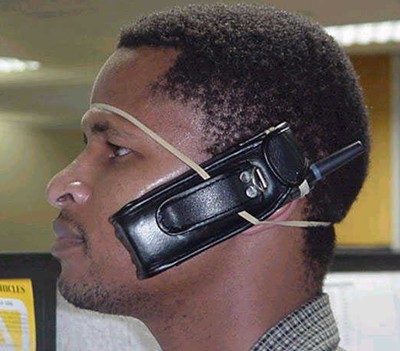
I would never shoulder a smartphone. What about a Bluetooth headset?
Randy, I had ZERO interest in any smartphone, let alone one made by Apple, until I used an iPhone to get remote mail access working for some of my users. I thought I didn't want a camera or notes or web browsing or anything other than a functional phone. I learned otherwise and now there's no going back.
EDIT: I came back to edit my post but it's mangled on the edit screen so I'm recomposing parts of this. Sorry.
A couple other things. A lot of businesses use Microsoft Exchange for email, and set up mobile access for their employees. The Exchange admin can enforce a policy requiring mobile users to secure their devices with a PIN so if the phone is lost, there's less chance of compromise.
There's an Android app that easily bypasses the PIN policy. So much for that layer of security. I've read the same thing can be done on an iPhone too but only if the phone is jailbroken (have not confirmed).
Speaking of phones locked with a PIN... To silence an iPhone, I flip a switch on the side of the phone. I can do that without unlocking the phone with the PIN. To silence a PIN-secured Evo, I have to wake up the phone, slide the unlock screen, enter my PIN, press "Unlock", then either hold down the volume-down button or hold down the main sleep switch for several seconds until the menu appears that lets me silence the phone. The point being the PIN lock on the iPhone is far less intrusive and seems less likely to be thwarted. The Evo lock is a big nuisance in comparison.
Again much of this is fixable in software but we're discussing the phones as they work now, not how they might work in the future if the user is patient.
| IP: Logged
|
|
|
|
Bobby Henderson
"Ask me about Trajan."
Posts: 10973
From: Lawton, OK, USA
Registered: Apr 2001
|
posted 07-19-2010 11:11 PM
quote: David Stambaugh
The difference is I don't want to give any login credentials to an untrusted 3rd party or risk having that 3rd party snooping around my phone. Netflix apps for Android are offered by "companies" like Pageonce, BeeKay, Next Mobile Web, The Hope Machine, Rishi Srivatsavai, Eddie Webb, SilentSmuggler, and pgray16. They can't manage my queue without me being logged in and passing my info through their app. Not gonna happen.
Thanks for the explanation.
In that regard, I've downloaded Android based applications for managing certain financial accounts (mortgage, credit card accounts, car insurance, etc.) directly from those companies rather than trusting the Android Market on whether what I was seeing was the official application.
Some applications seem a little unnecessary such as ones that are only a watered down mini version of a web site.
I do like how Facebook integrates with my phone book. The mobile version of Yelp integrates with my phone's GPS to add certain features I don't get through the regular Yelp web site. I've had some fun using the language translation app Talk To Me -although it tries to bleep out bad words, but isn't great at censoring words like "shit." Google Sky Map is pretty fun if you're into astronomy at all.
quote: Randy Stankey
I don't want a touch screen. I don't want a camera. I don't want a calendar/datebook/notepad. I don't want games. I don't want iApps. I don't want to play music. I don't want slide-out keyboards.
My problem is too many people I know like texting comments more often than making phone calls. And I've too often found myself in the situation where texting is better than talking -like when you're in a loud night club, bar or rock concert.
I simply cannot tolerate using a standard numerical phone key pad for entering text messages. A smart phone touch screen isn't the easiest thing to use for typing messages, but I can text on it a lot faster than I could ever manage with my old phone.
Originally, I was only looking at a "feature phone" with a full keyboard, such as the Samsung Impression through AT&T. Unfortunately, to qualify for a phone like that I would need to add a $20 per month texting plan or $30 per month data plan on top of the base plan. At that price it seems like you're getting a better bang for the buck going with a smart phone.
Edit - had to add something regarding music on phones:
My new phone definitely works better than my old phone for playing music, but I don't use it for playing music files or listening to radio. Most of the time when I'm listening to music on a portable player I'm working out -bicycling, jogging, lifting weights at the gym, etc. My $50 Sansa Clip+ is perfect for that. The device is small, very easy to use, supports a good variety of music formats, has a built in FM/AM radio, voice recorder and even has a MiniSD card slot. Because the device is small and cheap I'm not nearly as worried about breaking it while exercising as I am of ruining a smart phone.
Also, the Sansa Clip+ will play WAV files off a music CD seamlessly without inserting stupid 2 second breaks in between the songs.
| IP: Logged
|
|
|
|
|
|
|
|
|
|
|
|
|
|
|
|
|
|
|
|
All times are Central (GMT -6:00)
|
This topic comprises 9 pages: 1 2 3 4 5 6 7 8 9
|
Powered by Infopop Corporation
UBB.classicTM
6.3.1.2
The Film-Tech Forums are designed for various members related to the cinema industry to express their opinions, viewpoints and testimonials on various products, services and events based upon speculation, personal knowledge and factual information through use, therefore all views represented here allow no liability upon the publishers of this web site and the owners of said views assume no liability for any ill will resulting from these postings. The posts made here are for educational as well as entertainment purposes and as such anyone viewing this portion of the website must accept these views as statements of the author of that opinion
and agrees to release the authors from any and all liability.
|

 Home
Home







![[Razz]](tongue.gif)
![[Roll Eyes]](rolleyes.gif)


 Printer-friendly view of this topic