Film-Tech Cinema Systems
Film-Tech Forum ARCHIVE


my profile | my password | search | faq & rules | forum home
  next oldest topic   next newest topic
» Film-Tech Forum ARCHIVE   » Community   » The Afterlife   » Anyone consuming HD or Blu-ray? (Page 104)

 
This topic comprises 105 pages: 1  2  3  ...  101  102  103  104  105 
 
Author Topic: Anyone consuming HD or Blu-ray?
Joe Redifer
You need a beating today

Posts: 12859
From: Denver, Colorado
Registered: May 99


 - posted 09-13-2008 08:14 PM      Profile for Joe Redifer   Author's Homepage   Email Joe Redifer   Send New Private Message       Edit/Delete Post 
Mine just arrived right now. I chose the free shipping because I am a god damned cheap ass. If I am not too tired I will definitely watch part 1 tonight. I sure hope there's lots and lots of "edge enhancement". That's what the public demands!!!!!!

 |  IP: Logged

Mike Schindler
Phenomenal Film Handler

Posts: 1039
From: Oak Park, IL, USA
Registered: Jun 2002


 - posted 09-13-2008 08:16 PM      Profile for Mike Schindler   Email Mike Schindler   Send New Private Message       Edit/Delete Post 
KILL BILL is my favorite movie of all-time, but I resisted the urge pick these up because I'm waiting for the Japanese cuts to be released. I think Universal owns the video rights in Japan. They need to get to work on these.

I'm really loving the ease of importing most BD's. Last week I ordered the French version of MR. & MRS. SMITH, which is the only way you can get the director's cut on BD. It's pretty sweet.

 |  IP: Logged

Josh Kirkhart
Expert Film Handler

Posts: 165
From: Austin/Houston, TX, USA
Registered: Nov 2001


 - posted 09-13-2008 10:35 PM      Profile for Josh Kirkhart   Email Josh Kirkhart   Send New Private Message       Edit/Delete Post 
Anyone have recommendations for good/cheaper sources online?

For different regions mostly.

 |  IP: Logged

Joe Redifer
You need a beating today

Posts: 12859
From: Denver, Colorado
Registered: May 99


 - posted 09-13-2008 11:51 PM      Profile for Joe Redifer   Author's Homepage   Email Joe Redifer   Send New Private Message       Edit/Delete Post 
Have you seen the Japanese version of Kill Bill? I illegally downloaded it since I am an evil criminal and the differences are pretty cool, but they don't make or break a sale. It would have been cool to have the "unrated" cut as well, though. But I'm sure we'll get an "unrated" cut of crap like Pineapple Express and Disaster Movie instead. It's Disney. They don't do unrated.

 |  IP: Logged

Mike Schindler
Phenomenal Film Handler

Posts: 1039
From: Oak Park, IL, USA
Registered: Jun 2002


 - posted 09-14-2008 12:48 AM      Profile for Mike Schindler   Email Mike Schindler   Send New Private Message       Edit/Delete Post 
Yes, I have the Japanese DVDs of both volumes. I like them quite a bit. I think the changes to Volume 1 are quite substantial. Volume 2 only has one minor difference, but this is my favorite movie of all-time, so I want to make sure I have the absolute definitive version.

quote: Josh Kirkhart
Anyone have recommendations for good/cheaper sources online?

For different regions mostly.

For UK releases, Amazon UK seems to have prices comparable to domestic releases.

 |  IP: Logged

Bobby Henderson
"Ask me about Trajan."

Posts: 10973
From: Lawton, OK, USA
Registered: Apr 2001


 - posted 09-14-2008 03:21 AM      Profile for Bobby Henderson   Email Bobby Henderson   Send New Private Message       Edit/Delete Post 
Japanese versions? Blah.

If it ain't BD, if it ain't "The Whole Bloody Affair" unlimited and unrated edition, then it just doesn't count. The two new BDs represent the very best of Kill Bill available. Maybe Sophie Fatalé doesn't get both arms chopped off in Vol. 1, but it isn't LOW-DEF 480p crap either.

 |  IP: Logged

Joe Redifer
You need a beating today

Posts: 12859
From: Denver, Colorado
Registered: May 99


 - posted 09-14-2008 04:57 AM      Profile for Joe Redifer   Author's Homepage   Email Joe Redifer   Send New Private Message       Edit/Delete Post 
I just watched both. Volume 1 looked pretty good! The sound was much better than the standard DVD in Dolby® Digital™ or DTS®, both of which are popular 5.1 digital sound formats which can be enjoyed by people on the successful "DVD" format. Volume 2 didn't look quite as good as part 1. There was lots of banding where there should have been smooth gradients, especially the part where she is being buried. The part where you can barely see her at all when dirt is being piled on (which isn't even visible in the DVD version) has tons of compression artifacts as well. The sound was fine but you could listen to the master in the studio it was mixed in and I don't think it would make much of a difference in that movie.

Overall pretty good BDs and must owns.

 |  IP: Logged

Joe Redifer
You need a beating today

Posts: 12859
From: Denver, Colorado
Registered: May 99


 - posted 09-15-2008 07:06 PM      Profile for Joe Redifer   Author's Homepage   Email Joe Redifer   Send New Private Message       Edit/Delete Post 
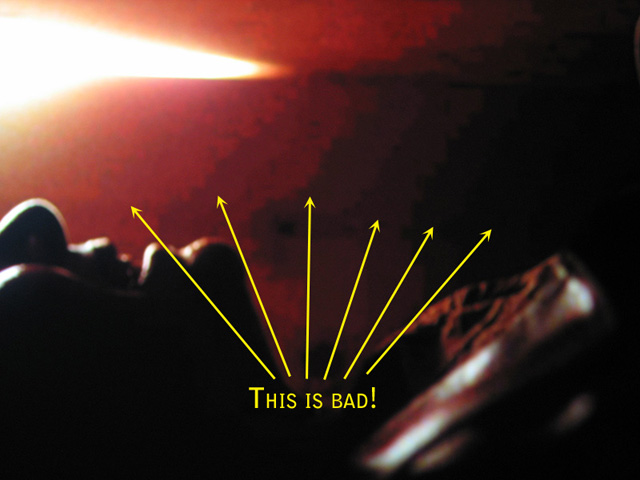
Some pictures of why Kill Bill Volume 2 on Blu-ray is unacceptable:

 -

 -

I had to increase the exposure time on my camera to get these to show up reliably enough, but these artifacts are easily viewable with the naked eye.

 |  IP: Logged

Bobby Henderson
"Ask me about Trajan."

Posts: 10973
From: Lawton, OK, USA
Registered: Apr 2001


 - posted 09-15-2008 11:43 PM      Profile for Bobby Henderson   Email Bobby Henderson   Send New Private Message       Edit/Delete Post 
I looked at the same point in Kill Bill: Vol. 2 - 00:36:21 (Chapter 7) and didn't see nearly as horrible the amount of banding shown in those photographs. Those differences could come from different PS3 output settings, different connection settings and different TV settings.

I still see a bit of macro-blocking happening with the image frozen, but I hardly see any of it with the video playing at normal speed.

It's also worth mentioning the video bit rate goes from a big 37Mbps peak and dumps down below 10Mbps precisely at that point (where the lid on that coffin is getting nailed shut, causing the picture to go black). MPEG-4 AVC and Microsoft's VC-1 formats are heavily dependent on inter-frame compression. That's going to make any still image screen shot an already flawed thing to judge.

I'll offer up another example of a Blu-ray movie with some serious banding issues (at least serious banding I observed on my own home setup): Hellboy. Nearly all the movie looks really great. But the opening title sequence where the "Hellboy" logo pulls back and disappears in the frame has some really serious banding. I don't know if it's all the red in the frame or what. Red colors seem much more difficult to data compress than others for some strange reason.

Oh, and another thing, the PS3 may choose to default to a "limited" color output rather than full RGB. That alone may cause the video from Blu-ray discs to be prone to banding. I don't know if that's a default setting for gaming or what.

 |  IP: Logged

Joe Redifer
You need a beating today

Posts: 12859
From: Denver, Colorado
Registered: May 99


 - posted 09-16-2008 12:25 AM      Profile for Joe Redifer   Author's Homepage   Email Joe Redifer   Send New Private Message       Edit/Delete Post 
My PS3 is forced to output RGB and the banding is there. It's there on yours, too. Maybe the TV blurs adjacent pixels more than mine does, or perhaps the contrast ratio isn't as good... I have a CRT. Regardless it is there because it is that way on the disc. Like I said, I had to increase the exposure time on my camera to get those so it is a bit exaggerated. Check for banding right before the coffin closes... right before everything turns black.

Interframes or not, this issue could have been solved and/or minimized by forcing a higher bitrate in these scenes. It is unprofessional to have such bad encoding. If I wanted to see this shit, I'd stick with DVD! They just put the compressor on "Auto" and walked away. They could have forced a whole slew of i-frames in that section. I know because I can do this when I author DVDs to avoid this nonsense. These scenes look just as bad as the DVD, especially the second picture.

 |  IP: Logged

Bill Gabel
Film God

Posts: 3873
From: Technicolor / Postworks NY, USA
Registered: Jan 2002


 - posted 10-09-2008 09:14 AM      Profile for Bill Gabel   Email Bill Gabel   Send New Private Message       Edit/Delete Post 
quote: Scott Jentsch
and they haven't instituted the extra fee yet
Starting next month Netflix's surcharge for Blu-ray DVDs will start. It amounts to a whole $1.00 added to your monthly plan.

Happy Renting [thumbsup]

 |  IP: Logged

Mike Schindler
Phenomenal Film Handler

Posts: 1039
From: Oak Park, IL, USA
Registered: Jun 2002


 - posted 10-10-2008 04:19 AM      Profile for Mike Schindler   Email Mike Schindler   Send New Private Message       Edit/Delete Post 
I have a PS3 hooked up to a projector via HDMI. I also have it connected to a regular TV via composite. The idea is that I want to be able to watch important stuff on the projector, and then watch things like special features on the regular TV so as to save the bulb. However, switching outputs seems to be a pain in the ass.

Is there an easy way to switch back and forth between outputs? And by "easy" I mean "something my lazy, non-tech roommate could handle."

 |  IP: Logged

Joe Redifer
You need a beating today

Posts: 12859
From: Denver, Colorado
Registered: May 99


 - posted 10-10-2008 04:32 AM      Profile for Joe Redifer   Author's Homepage   Email Joe Redifer   Send New Private Message       Edit/Delete Post 
Press and hold the power button on the console for a few seconds until you hear 5 beeps. This resets it to standard definition. You'll have to go back in and re-enable the HD modes (audio and video) after you turn on your projector.

Or just do what I do: Ignore the special features. Throw them into the trash where they belong. You only ever watch 'em once anyway.

 |  IP: Logged

Mike Schindler
Phenomenal Film Handler

Posts: 1039
From: Oak Park, IL, USA
Registered: Jun 2002


 - posted 10-10-2008 12:40 PM      Profile for Mike Schindler   Email Mike Schindler   Send New Private Message       Edit/Delete Post 
Thanks for the info. Would this also work if I were using component instead of composite?

 |  IP: Logged

Joe Redifer
You need a beating today

Posts: 12859
From: Denver, Colorado
Registered: May 99


 - posted 10-10-2008 07:43 PM      Profile for Joe Redifer   Author's Homepage   Email Joe Redifer   Send New Private Message       Edit/Delete Post 
Yes, but it would still be reset to 480i.

 |  IP: Logged


All times are Central (GMT -6:00)
This topic comprises 105 pages: 1  2  3  ...  101  102  103  104  105 
 
   Close Topic    Move Topic    Delete Topic    next oldest topic   next newest topic
 - Printer-friendly view of this topic
Hop To:


Powered by Infopop Corporation
UBB.classicTM 6.3.1.2

The Film-Tech Forums are designed for various members related to the cinema industry to express their opinions, viewpoints and testimonials on various products, services and events based upon speculation, personal knowledge and factual information through use, therefore all views represented here allow no liability upon the publishers of this web site and the owners of said views assume no liability for any ill will resulting from these postings. The posts made here are for educational as well as entertainment purposes and as such anyone viewing this portion of the website must accept these views as statements of the author of that opinion and agrees to release the authors from any and all liability.

© 1999-2020 Film-Tech Cinema Systems, LLC. All rights reserved.