Film-Tech Cinema Systems
Film-Tech Forum ARCHIVE
Topic Closed  Topic Closed


my profile | my password | search | faq & rules | forum home
  next oldest topic   next newest topic
» Film-Tech Forum ARCHIVE   » Community   » Film-Yak   » Upload your random pictures (part 3) (Page 85)

 
This topic comprises 101 pages: 1  2  3  ...  82  83  84  85  86  87  88  ...  99  100  101 
 
Author Topic: Upload your random pictures (part 3)
Tim Reed
Better Projection Pays

Posts: 5246
From: Northampton, PA
Registered: Sep 1999


 - posted 12-11-2009 11:54 PM      Profile for Tim Reed   Author's Homepage     Send New Private Message       Edit/Delete Post 
quote: Randy Stankey
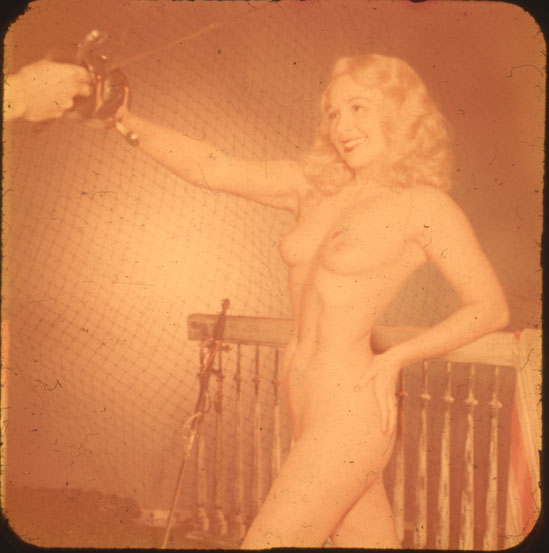
I still have to figure out if I can physically clean the slide then use digital techniques to remove the rest of the flaws.
Randy, get a scanner that has "Digital ICE" technology. It will get rid of ALL of that stuff, like it was never there. In addition to the RGB acquisition, ICE scanners do an IR scan to determine what parts are physical anomalies on the surface of the film - which it then simply ignores. It's really cool. I only wish I'd had something like it years ago, when I was remastering the drive-in trailers.

Btw, we wanna see her again after you're done with her. [Wink] She's gorgeous.

 |  IP: Logged

Randy Stankey
Film God

Posts: 6539
From: Erie, Pennsylvania
Registered: Jun 99


 - posted 12-12-2009 01:20 AM      Profile for Randy Stankey   Email Randy Stankey   Send New Private Message       Edit/Delete Post 
My Canon scanner has a similar feature. It's called FARE. It uses an IR pass to locate the dust and scratches very much the same way ICE does.

It works pretty well but it won't get all the defects. The image above has already been cleaned up a lot. Here's what it looked like before I worked on it.

 -

I've still got work to do but, as I said, it's easier to learn when you have fun images to practice with! [Big Grin]

 |  IP: Logged

Bobby Henderson
"Ask me about Trajan."

Posts: 10973
From: Lawton, OK, USA
Registered: Apr 2001


 - posted 12-12-2009 01:43 AM      Profile for Bobby Henderson   Email Bobby Henderson   Send New Private Message       Edit/Delete Post 
If I'm working with some particularly challenging images I'll occasionally work in 16-bit per channel L*a*b mode.

L*a*b can be really useful if you're using a lot of "auto" features from a scanner like ICE or doing other de-noise or de-speckle types of things. Those types of filters will often soften an image. I think that sort of thing should be used as a last resort, but you have no choice with certain images. In L*a*b color mode the color luminance values are separated from the lightness values. You can do work to improve contrast levels and sharpness in the lightness channel without messing up the color. L*a*b is pretty tricky though. You just have to experiment.

 |  IP: Logged

Randy Stankey
Film God

Posts: 6539
From: Erie, Pennsylvania
Registered: Jun 99


 - posted 12-12-2009 09:51 AM      Profile for Randy Stankey   Email Randy Stankey   Send New Private Message       Edit/Delete Post 
I tried L-A-B. I see how it works but it will take some time to get my head wrapped around it. I'm so used to working in R-G-B or C-M-Y.

I don't see how I can get the Canon driver to scan into L-A-B. I suppose I will have to scan into the regular mode(s) then convert to it. I guess this would be a good reason to buy Silverfast. No?

 |  IP: Logged

Bobby Henderson
"Ask me about Trajan."

Posts: 10973
From: Lawton, OK, USA
Registered: Apr 2001


 - posted 12-12-2009 01:07 PM      Profile for Bobby Henderson   Email Bobby Henderson   Send New Private Message       Edit/Delete Post 
I'm not sure if any affordable flat bed scanners can scan directly into L*a*b color more. Some high end scanners (drum type usually) can scan direct into CMYK and L*a*b.

The best thing to do is scan the original in 16-bit per channel mode and do as much of the levels and curves adjusting in the pre-scan dialog boxes. Once you scan the image you can convert it to L*a*b.

One more note about L*a*b: it can be pretty handy to use in prepping a RGB-based image for CMYK print output. You can tone down color saturation levels into CMYK safe gamma without ruining the contrast in the image.

You have to buy Silverfast separately? My Epson scanner had that scanning software bundled.

 |  IP: Logged

Tim Reed
Better Projection Pays

Posts: 5246
From: Northampton, PA
Registered: Sep 1999


 - posted 12-12-2009 01:17 PM      Profile for Tim Reed   Author's Homepage     Send New Private Message       Edit/Delete Post 
quote: Bobby Henderson
In L*a*b color mode the color luminance values are separated from the lightness values.
Humm, that sounds like something that might be up my alley. Can you do anything with something like this in that mode?

 -

 |  IP: Logged

Bobby Henderson
"Ask me about Trajan."

Posts: 10973
From: Lawton, OK, USA
Registered: Apr 2001


 - posted 12-12-2009 03:45 PM      Profile for Bobby Henderson   Email Bobby Henderson   Send New Private Message       Edit/Delete Post 
 -

Far from perfect, but it's a start. I did this simply by doing some quick brightness/contrast tweaks to the individual "a" and "b" channels and then increasing the contrast in the lightness channel.

 |  IP: Logged

Scott Norwood
Film God

Posts: 8146
From: Boston, MA. USA (1774.21 miles northeast of Dallas)
Registered: Jun 99


 - posted 12-12-2009 04:00 PM      Profile for Scott Norwood   Author's Homepage   Email Scott Norwood   Send New Private Message       Edit/Delete Post 
Tim--who's the girl with the Moviola?

 |  IP: Logged

Tim Reed
Better Projection Pays

Posts: 5246
From: Northampton, PA
Registered: Sep 1999


 - posted 12-12-2009 04:30 PM      Profile for Tim Reed   Author's Homepage     Send New Private Message       Edit/Delete Post 
Bobby... humm, did you do that in Photoshop? It's also a 24-bit jpeg at the moment. The original scan is Cineon format.

Here's some work I'd done on it a couple years ago. I used some heavy filtering to minimize the scratches and dirt that got blown out when trying to correct for that much color loss.

 -

Scott... I wish I knew. It's a photo I snagged from an eBay auction long ago.

 |  IP: Logged

Bobby Henderson
"Ask me about Trajan."

Posts: 10973
From: Lawton, OK, USA
Registered: Apr 2001


 - posted 12-12-2009 05:34 PM      Profile for Bobby Henderson   Email Bobby Henderson   Send New Private Message       Edit/Delete Post 
Yeah, I did the quick tweaks in Photoshop. With more careful work it might be possible to get the color closer to a more normal look. However, that's a pretty extreme image -almost a monochrome magenta/black duotone image.

It's pretty amazing what image manipulation tools can do these days. The color work done on The Godfather restoration was pretty amazing when you see the before/after comparisons. OTOH, the overly dark images had color data in all the channels. If you're missing the yellow layer (or any other layer) entirely then you're pretty well screwed when it comes to restoring a full color spectrum to the image.

 |  IP: Logged

Brad Miller
Administrator

Posts: 17775
From: Plano, TX (36.2 miles NW of Rockwall)
Registered: May 99


 - posted 12-13-2009 10:55 PM      Profile for Brad Miller   Author's Homepage   Email Brad Miller       Edit/Delete Post 
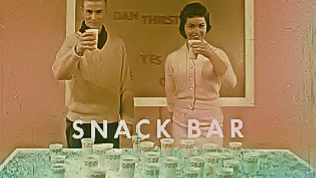
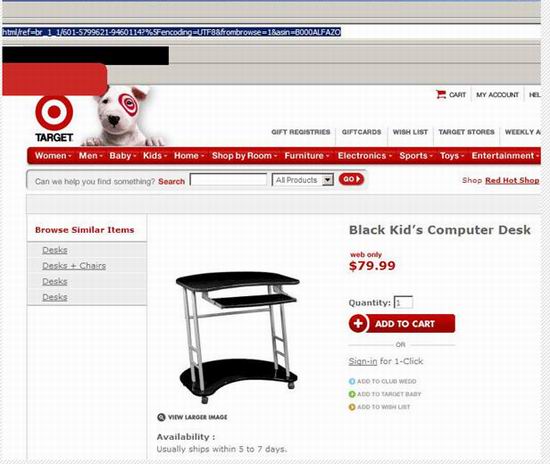
Those racists!

 -

 |  IP: Logged

Joe Redifer
You need a beating today

Posts: 12859
From: Denver, Colorado
Registered: May 99


 - posted 12-13-2009 11:55 PM      Profile for Joe Redifer   Author's Homepage   Email Joe Redifer   Send New Private Message       Edit/Delete Post 
 -

 |  IP: Logged

Bobby Henderson
"Ask me about Trajan."

Posts: 10973
From: Lawton, OK, USA
Registered: Apr 2001


 - posted 12-13-2009 11:58 PM      Profile for Bobby Henderson   Email Bobby Henderson   Send New Private Message       Edit/Delete Post 
Mammy!

 |  IP: Logged

Mike Blakesley
Film God

Posts: 12767
From: Forsyth, Montana
Registered: Jun 99


 - posted 12-14-2009 12:01 AM      Profile for Mike Blakesley   Author's Homepage   Email Mike Blakesley   Send New Private Message       Edit/Delete Post 
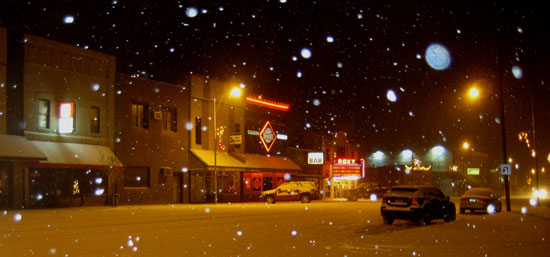
Downtown Forsyth, Montana with snow storm in progress.

 -

 |  IP: Logged

Randy Stankey
Film God

Posts: 6539
From: Erie, Pennsylvania
Registered: Jun 99


 - posted 12-14-2009 12:02 AM      Profile for Randy Stankey   Email Randy Stankey   Send New Private Message       Edit/Delete Post 
Apparently, women had to wear nipple protectors when they played the conga drums, too.

 -

Things sure were weird back in 1958! [Eek!]

 |  IP: Logged


All times are Central (GMT -6:00)
This topic comprises 101 pages: 1  2  3  ...  82  83  84  85  86  87  88  ...  99  100  101 
 
   Open Topic    Move Topic    Delete Topic    next oldest topic   next newest topic
 - Printer-friendly view of this topic
Hop To:


Powered by Infopop Corporation
UBB.classicTM 6.3.1.2

The Film-Tech Forums are designed for various members related to the cinema industry to express their opinions, viewpoints and testimonials on various products, services and events based upon speculation, personal knowledge and factual information through use, therefore all views represented here allow no liability upon the publishers of this web site and the owners of said views assume no liability for any ill will resulting from these postings. The posts made here are for educational as well as entertainment purposes and as such anyone viewing this portion of the website must accept these views as statements of the author of that opinion and agrees to release the authors from any and all liability.

© 1999-2020 Film-Tech Cinema Systems, LLC. All rights reserved.