Film-Tech Cinema Systems
Film-Tech Forum ARCHIVE


my profile | my password | search | faq & rules | forum home
  next oldest topic   next newest topic
» Film-Tech Forum ARCHIVE   » Community   » The Afterlife   » Anyone consuming HD or Blu-ray? (Page 83)

 
This topic comprises 105 pages: 1  2  3  ...  80  81  82  83  84  85  86  ...  103  104  105 
 
Author Topic: Anyone consuming HD or Blu-ray?
Joe Redifer
You need a beating today

Posts: 12859
From: Denver, Colorado
Registered: May 99


 - posted 03-24-2008 05:53 PM      Profile for Joe Redifer   Author's Homepage   Email Joe Redifer   Send New Private Message       Edit/Delete Post 
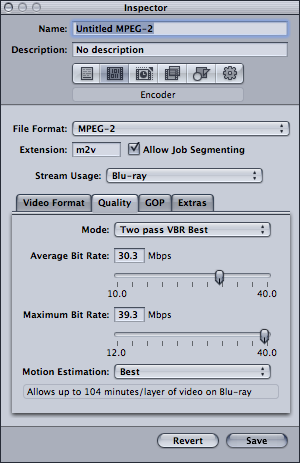
Actually Compressor (an Apple product which I adore) does offer Blu-ray encoding, but only in MPEG 2 form.

 -

DVD Studio Pro offers HD DVD burning, but that's pretty useless. It also allows burning HD DVD to SD DVD media, but again... useless! I still have hope.

 |  IP: Logged

Ron Funderburg
Jedi Master Film Handler

Posts: 814
From: Chickasha, Oklahoma, USA
Registered: Nov 2007


 - posted 03-24-2008 06:29 PM      Profile for Ron Funderburg   Author's Homepage   Email Ron Funderburg   Send New Private Message       Edit/Delete Post 
I got my PS3 the other day and yes I settled for the 40-gig unit as I'm not in to games. It seemed to be a pretty intelligent system it seemed to talk to the TV and set to the highest resolution, it set it to 24 fames in Cinema mode blu-ray and I think for upgraded but not 100% sure on that.

The picture is stunning on both up convert and especially on Blu-ray! Now I just need more Blu-ray movies!

 |  IP: Logged

Bobby Henderson
"Ask me about Trajan."

Posts: 10973
From: Lawton, OK, USA
Registered: Apr 2001


 - posted 03-24-2008 07:09 PM      Profile for Bobby Henderson   Email Bobby Henderson   Send New Private Message       Edit/Delete Post 
quote: Ron Funderburg
It seemed to be a pretty intelligent system it seemed to talk to the TV and set to the highest resolution, it set it to 24 fames in Cinema mode blu-ray and I think for upgraded but not 100% sure on that.
I'm not sure I understand what you're talking about with the term "upgraded." Are you talking about the system update feature in PS3 or upconverting functions for standard DVDs? Out of the box, the upconverting performance of PS3 looks like crap. But once you apply the latest firmware it looks much better. Still, it doesn't compare at all to the native 1080p video on most Blu-ray movies. Big freaking difference.

What specific model of HDTV do you have? Is it a 120Hz model that supports true 5:5 support of 24fps video from Blu-ray? Or another model that has refresh rates available in multiples of 24, such as 96Hz?

I'm not sure if you can force 24fps output from PS3's Blu-ray player. I have my Sony Bravia XBR set connected directly to the PS3 via HDMI 1.3a cable and just had it auto-detect the TV's capabilities when I did the initial setup.

One thing I've noticed is the PS3 appears to be doing a reverse 3:2 conversion to make certain standard DVDs look like 24fps material. Maybe I'm just seeing things. I don't know. The 24fps thing is pretty nice for Blu-ray movies though.

 |  IP: Logged

Ron Funderburg
Jedi Master Film Handler

Posts: 814
From: Chickasha, Oklahoma, USA
Registered: Nov 2007


 - posted 03-24-2008 07:31 PM      Profile for Ron Funderburg   Author's Homepage   Email Ron Funderburg   Send New Private Message       Edit/Delete Post 
Bobby The upgrade was the first thing I did period! THen had it do the auto detech. I have a panasonic HD-TV not sure about the rest on it. But the player is set for 1080i (which I guess is the best the set can do) and it set the output to Cinema and when I check it I thought it said 24 frames not sure now. To tired to know for certain just did an inventory (first one in two weeks) and my brain is tired. Talk to you about it later! Must have food and drink now!

 |  IP: Logged

Joe Redifer
You need a beating today

Posts: 12859
From: Denver, Colorado
Registered: May 99


 - posted 03-24-2008 07:56 PM      Profile for Joe Redifer   Author's Homepage   Email Joe Redifer   Send New Private Message       Edit/Delete Post 
quote: Bobby Henderson
I'm not sure if you can force 24fps output from PS3's Blu-ray player.
You can. The settings are ON, OFF and AUTO.

 |  IP: Logged

Carey Barber
Expert Film Handler

Posts: 143
From: Newport News, VA, USA
Registered: Jan 2003


 - posted 03-24-2008 09:01 PM      Profile for Carey Barber   Email Carey Barber   Send New Private Message       Edit/Delete Post 
How much perceivable difference is there between regular Dolby Digital and Dolby TrueHD (or between regular DTS and DTS-MA)?

Also, for someone who has mediocre speakers like me, would there be any perceivable difference?

 |  IP: Logged

Bobby Henderson
"Ask me about Trajan."

Posts: 10973
From: Lawton, OK, USA
Registered: Apr 2001


 - posted 03-24-2008 11:15 PM      Profile for Bobby Henderson   Email Bobby Henderson   Send New Private Message       Edit/Delete Post 
It depends on what hardware you consider "mediocre."

Obviously someone with a considerably "entry level" home theater setup would be less likely to notice differences between lossy and lossless audio tracks compared to someone with high end gear.

Some of the differences also depend on what sort of material is being played. I think well engineered and mixed music has a much greater capability to show off strengths and weaknesses in different audio encodings than material like movie soundtracks.

Still, whether you can actually hear the difference or not between lossy, lossless or uncompressed tracks on your home stereo hardware, I believe it is a higher matter of principal to store the best quality of audio track on the movie disc as possible. I would much rather have my home stereo hardware be the weak link in the equation rather than the weak link be the movie disc itself. The movie disc is the same regardless of the kind of gear on which it is played. If someone is able to afford much better quality hardware, then it's only right for that person to be able to squeeze out even more performance quality out of the same software disc.

Something to add via "EDIT":

Sometime Monday (perhaps this evening) Sony made PS3 firmware version 2.20 available to download and install.

Since I don't currently own any Blu-ray movies with BD Profile 2.0 content, I think I may wait a couple or so days at least before updating my PS3 system software. Surely Sony has beta-tested this stuff, but you still never know. I'd rather others discover bugs and then download a 2.20.01 release.

 |  IP: Logged

Joe Redifer
You need a beating today

Posts: 12859
From: Denver, Colorado
Registered: May 99


 - posted 03-25-2008 02:03 AM      Profile for Joe Redifer   Author's Homepage   Email Joe Redifer   Send New Private Message       Edit/Delete Post 
Also, keep in mind that it's not just "lossless", but higher resolution as well. Dolby Digital tops out at an extremely wimpy 16-bit, 48Khz 5.1 discrete channels. That's almost not even worth having ears if you have to listen to horrible atrocities like that. But the lossless nonsense can do 24-bit, 96Khz 7.1 discrete channels which is better than having God's vagina kiss your ears.

 |  IP: Logged

Carey Barber
Expert Film Handler

Posts: 143
From: Newport News, VA, USA
Registered: Jan 2003


 - posted 03-25-2008 09:41 AM      Profile for Carey Barber   Email Carey Barber   Send New Private Message       Edit/Delete Post 
quote:
Still, whether you can actually hear the difference... I believe it is a higher matter of principal to store the best quality of audio track on the movie disc as possible.
I certainly agree...I was just curious as to how much 'real-world' difference there is outside of just the specs. (Of course, "God's vagina kissing your ears" does sound like a pretty favorable review.)

Has anyone been able to do an A-B comparison?

 |  IP: Logged

Ron Funderburg
Jedi Master Film Handler

Posts: 814
From: Chickasha, Oklahoma, USA
Registered: Nov 2007


 - posted 03-25-2008 05:30 PM      Profile for Ron Funderburg   Author's Homepage   Email Ron Funderburg   Send New Private Message       Edit/Delete Post 
My bad the 24 fps is only on the blu-ray HD's not regular DVD's. Still it made all the changes to the system I didn't have to. Now I also it changed it to 1080i and upon review of the settings it say 1080p but my TV doesn't claim to be 1080p and I bought it in Oct. 2006 but still I'm sure it said 1080p.

Oh well it all looks great!

Bobbi it is very doubtful that any can hear the difference in different levels on a home system unless they put mega bucks in. Or it is the little Bose system that everyone knows is better, ya sure!

I have pretty high, end stuff all be it a few years old, and I can't hear a true difference between them.

Edit (like an idiot)

I actually can hear the difference between the CDs and Dolby Digital I can't hear any quality difference between the Dolby Digital and the DTS. I haven't actually tried the HD sound or whatever it is called yet! I'm not sure I can even do that with the receiver I have. I think that option is only though the HDMI cable but might be wrong.

Okay bobby I downloaded software Sunday for Sony's PS3 Blu-ray and I'm already out of date? DAMN!

Added to post 03/26/08

Just found this article that explains the whole interlace progressive thing!

"
Geoffrey Morrison Blog

1080i v. 1080p

Posted Mon Aug 7, 2006, 1:57 PM ET

There has been a lot of concern and confusion over the difference between 1080i and 1080p. This stems from the inability of many TVs to accept 1080p. To make matters worse, the help lines at many of the TV manufacturers (that means you, Sony), are telling people that their newly-bought 1080p displays are really 1080i. They are idiots, so let me say this in big bold print, as far as movies are concerned THERE IS NO DIFFERENCE BETWEEN 1080i AND 1080p. See, I did it in caps too, so it must be true. Let me explain (if your eyes glaze over, the short version is at the end).

For clarification, let me start by saying that there are essentially no 1080i TVs anymore. Unless you bought a CRT based TV, every modern TV is progressive scan (as in LCD, Plasma, LCOS, DLP). They are incapable of displaying a 1080i signal as 1080i. So what we’re talking about here mostly applies to people with 1080p native displays.

Movies and almost all TV shows are shot at 24 frames-per-second (either on film or on 24fps HD cameras). All TVs have a refresh rate of 60Hz. What this means is that the screen refreshes 60 times a second. In order to display something that is 24fps on something that is essentially 60fps, you need to make up, or create new frames. This is done using a method called 3:2 pulldown (or more accurately 2:3 pulldown). The first frame of film is doubled, the second frame of film is tripled, the third frame of film is doubled and so on, creating a 2,3,2,3,2,3,2 sequence. It basically looks like this: 1a,1b,2a,2b,2c,3a,3b,4a… Each number is the original film frame. This lovely piece of math allows the 24fps film to be converted to be displayed on 60Hz products (nearly every TV in the US, ever).

This can be done in a number of places. With DVDs, it was all done in the player. With HD DVD, it is done in the player to output 1080i. With Blu-ray, there are a few options. The first player, the Samsung, added the 3:2 to the signal, interlaced it, and then output that (1080i) or de-interlaced the same signal and output that (1080p). In this case, the only difference between 1080i and 1080p is where the de-interlacing is done. If you send 1080i, the TV de-interlaces it to 1080p. If you send your TV the 1080p signal, the player is de-interlacing the signal. As long as your TV is de-interlacing the 1080i correctly, then there is no difference. Check out this article for more info on that.

The next Blu-ray players (from Pioneer and the like) will have an additional option. They will be able to output the 1080p/24 from the disc directly. At first you may think that if your TV doesn't accept 1080p, you'll miss out on being able to see the "unmolested" 1080p/24 from the disc. Well even if your TV could accept the 1080p/24, your TV would still have to add the 3:2 pulldown itself (the TV is still 60Hz). So you're not seeing the 1080p/24 regardless.

The only exception to that rule is if you can change the refresh on the TV. Pioneer's plasmas can be set to refresh at 72 Hz. These will take the 1080p/24, and do a simple 3:3 pull down (repeating each frame 3 times).

Short Version
What this all means is this:

• When it comes to movies (as in HD DVD and Blu-ray) there will be no visible difference between the 1080i signal and the 1080p signal, as long as your TV correctly de-interlaces 1080i. So even if you could input 1080p, you wouldn't see a difference (because there is none).

• There is no additional or new information in a 1080p signal from movie based content.

• The only time you would see a difference is if you have native 1080p/60 content, which at this point would only come from a PC and maybe the PS3. 1080p/60 does have more information than 1080i/30, but unless you're a gamer you will probably never see native 1080p/60 content. It is incredibly unlikely that they will ever broadcast 1080p (too much bandwidth) or that 1080p/60 content will show up on discs (too much storage space and no one is using it to record/film).

So all of you people who bought 1080p displays only to be told by the companies that you had bought 1080i TVs, relax. The TV will convert everything to 1080p. Now if you bought a TV that doesn't de-interlace 1080i correctly, well, that's a whole other story. "

[ 03-26-2008, 12:10 PM: Message edited by: Ron Funderburg ]

 |  IP: Logged

Chris Slycord
Film God

Posts: 2986
From: 청주시, 경북도, South Korea
Registered: Mar 2007


 - posted 03-26-2008 02:38 PM      Profile for Chris Slycord   Email Chris Slycord   Send New Private Message       Edit/Delete Post 
Him saying "there's no difference between 1080p and 1080i" is [bs] . Yes, it's true that a 60-Hz refresh rate TV will not show any difference between them... but that's like saying that a black-and-white signal is no different than color because a black-and-white TV doesn't show any difference between them.

edit: And saying that there's no difference between them because if a TV deinterlaces correctly you won't see a difference; obviously, it is IMPOSSIBLE for a progressive image through a progressive display to show any issues with deinterlacing.

[ 03-26-2008, 03:43 PM: Message edited by: Chris Slycord ]

 |  IP: Logged

Scott Jentsch
Phenomenal Film Handler

Posts: 1061
From: New Berlin, WI, USA
Registered: Apr 2003


 - posted 03-26-2008 04:39 PM      Profile for Scott Jentsch   Author's Homepage   Email Scott Jentsch   Send New Private Message       Edit/Delete Post 
Ugh, here we go again with the misunderstandings.

1080i from a 1080p source does not lose any information. 1080i from a 1080i source does have "missing" information.

Some of the first Blu-ray players actually convert 1080p from the disc to 1080i and then to 1080p again. Some may still do that.

Whether the player does it or the TV, it doesn't matter, so long as whatever device is doing it, does it right. Some TV's don't.

Before getting too bent out of shape about 1080i vs. 1080p, you may want to investigate the actual data path the signal goes through before getting displayed. You may be surprised at how many times it's touched!

If I were going to be plunking down the money on a 1080p set, I'd be making sure that it did 1080i -> 1080p conversion nicely, and that it did native support for 1080p24. Manufacturers need to toss any less-able sets out of their product lines, and the easiest way for them to justify it is if such sets are gathering dust on store shelves.

 |  IP: Logged

Ron Funderburg
Jedi Master Film Handler

Posts: 814
From: Chickasha, Oklahoma, USA
Registered: Nov 2007


 - posted 03-26-2008 05:56 PM      Profile for Ron Funderburg   Author's Homepage   Email Ron Funderburg   Send New Private Message       Edit/Delete Post 
Guys don't get bent of shape at me I didn't write the article just copied and posted it here!

 |  IP: Logged

Joe Redifer
You need a beating today

Posts: 12859
From: Denver, Colorado
Registered: May 99


 - posted 03-26-2008 06:01 PM      Profile for Joe Redifer   Author's Homepage   Email Joe Redifer   Send New Private Message       Edit/Delete Post 
Bullshit bullshit bullshit bullshit bullshit bullshit bullshit bullshit bullshit bullshit bullshit bullshit bullshit bullshit bullshit bullshit bullshit bullshit bullshit bullshit bullshit bullshit bullshit bullshit bullshit bullshit bullshit bullshit bullshit bullshit bullshit bullshit bullshit bullshit bullshit bullshit bullshit bullshit bullshit bullshit bullshit bullshit bullshit bullshit bullshit bullshit bullshit bullshit bullshit bullshit bullshit bullshit bullshit bullshit bullshit bullshit bullshit bullshit bullshit bullshit bullshit!!

I can see a difference with my eyeballs. I bet they'll also say 480i is no different than 480p. I guess they assume that the ONLY thing anyone would EVER want to do in 1080p is watch movies recorded at 24 frames per second. With the normal 60i frame rate, you only get 540 lines per moment in time. WEAK! Don't give me this "But two fields equals one frame" bullshit. The two fields are from two different moments in time and are therefore independent images no matter how you try to slice it. This argument is used by those who do not understand video and framrates. They also don't seem to understand that two fields are never displayed at the same time whereas progressive video gives you all of the information 60 times per second.

quote: Chris Slycord
it's true that a 60-Hz refresh rate TV will not show any difference between them
Bullshit!

quote: Scott Jentsch
1080i from a 1080p source does not lose any information.
Bullshit! This is only kind of true if you are watching movies and NOTHING ELSE, and even then you get the flicker that is associated with interlacing. Interlace flicker is absolutely unacceptable. Interlacing is NEVER a good idea. 1080i has absolutely no right to exist whatsoever. People are just trying to justify the TV they purchased. Me? I own a 1080i CRT.

quote: Scott Jentsch
1080i from a 1080i source does have "missing" information.

I think you could word that better. 1080i from a 1080i source having missing information? Missing from what, itself? That's like saying my left eyeball has missing information from my left eyeball.

Also, why do HDTVs still use the 29.97, 23.98, etc frame rates? This was done so color could be broadcast on NTSC. Why do we still have these frame rates for HDTV material? They should be 30 and 24, respectively.

 |  IP: Logged

Bobby Henderson
"Ask me about Trajan."

Posts: 10973
From: Lawton, OK, USA
Registered: Apr 2001


 - posted 03-26-2008 06:08 PM      Profile for Bobby Henderson   Email Bobby Henderson   Send New Private Message       Edit/Delete Post 
While 1080i and 1080p may share the same 1920 X 1080 pixel layout, they don't deliver the same visual results. Therefore they cannot really be considered equal.

1080i based video typically looks softer than true 1080p video. And it's prone to issues that do occur with any form of interlaced video (sawtooth edge detail, dot crawl, shimmering, etc.).

Geoffrey Morrison is probably just spouting some crap about 1080i because he probably owns a TV limited to no better than 1080i source inputs and just wants to feel better about it.

 |  IP: Logged


All times are Central (GMT -6:00)
This topic comprises 105 pages: 1  2  3  ...  80  81  82  83  84  85  86  ...  103  104  105 
 
   Close Topic    Move Topic    Delete Topic    next oldest topic   next newest topic
 - Printer-friendly view of this topic
Hop To:


Powered by Infopop Corporation
UBB.classicTM 6.3.1.2

The Film-Tech Forums are designed for various members related to the cinema industry to express their opinions, viewpoints and testimonials on various products, services and events based upon speculation, personal knowledge and factual information through use, therefore all views represented here allow no liability upon the publishers of this web site and the owners of said views assume no liability for any ill will resulting from these postings. The posts made here are for educational as well as entertainment purposes and as such anyone viewing this portion of the website must accept these views as statements of the author of that opinion and agrees to release the authors from any and all liability.

© 1999-2020 Film-Tech Cinema Systems, LLC. All rights reserved.